Thumbium Review 2026: Price, Features, OpenAI Costs & OTOs
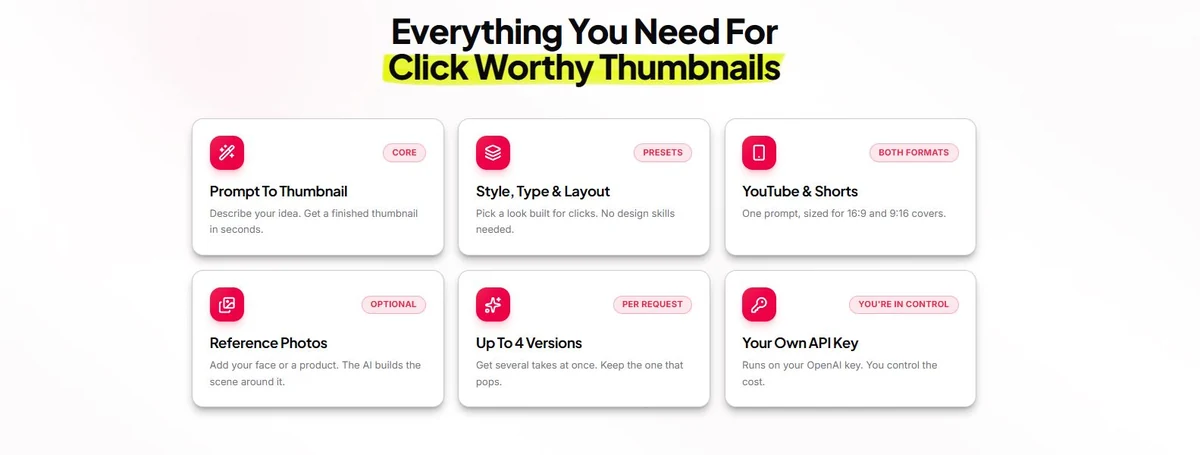
Thumbium is an AI thumbnail generator built specifically for YouTube and vertical Shorts-style covers. It combines prompt-based generation, optional subject/product/background reference photos, overlay-text controls, art-style presets, up to four variations and a gallery workflow. Its unusual pricing model is that the Thumbium software is sold as a one-time purchase while image generation runs through the buyer's own OpenAI API key.

Thumbium's strength is workflow. Instead of opening a blank design canvas, you move through a six-step process built around thumbnail decisions: format, reference images, prompt, text, art style, quality and variations. The trade-off is that you must connect an OpenAI API key, monitor generation costs and understand that the vendor's one-time price applies to Thumbium—not to the underlying AI usage.
Model the real cost: Use the free Software Deal & ROI Calculator to compare Thumbium’s one-time software price against a subscription alternative while including ongoing API usage.
What this review covers
What Does Thumbium Actually Do?
Thumbium is a purpose-built AI thumbnail creator rather than a general graphic-design suite. You can begin with only a text idea, or provide real images of a subject, product or background. From there, the app lets you control overlay text, text position and size, art style, image type, output quality and the number of variations.
The sales page positions Thumbium as an alternative to spending an hour or two in a manual editor or paying a designer for every video. That comparison is directionally useful, but the real question is whether Thumbium's generated results are good enough for a particular channel. Because this is a research-based review, we are not treating the vendor's example thumbnails as proof that every prompt will produce a publishable result.
How Thumbium Works: Six Steps
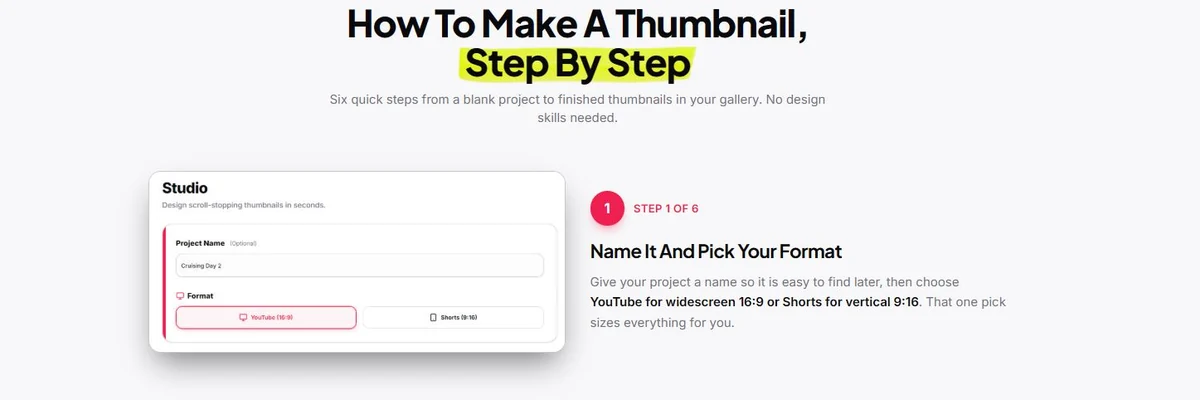
1. Name the project and pick a format
You start by naming the project and choosing either YouTube 16:9 or a vertical 9:16 format. This makes the output target explicit before generation rather than relying on a later crop.
2. Add reference photos and describe the idea
Subject, product and background images are optional. If you upload them, Thumbium can use those references while building the scene. The prompt box is where you explain what should happen in the thumbnail and what should remain recognizable.

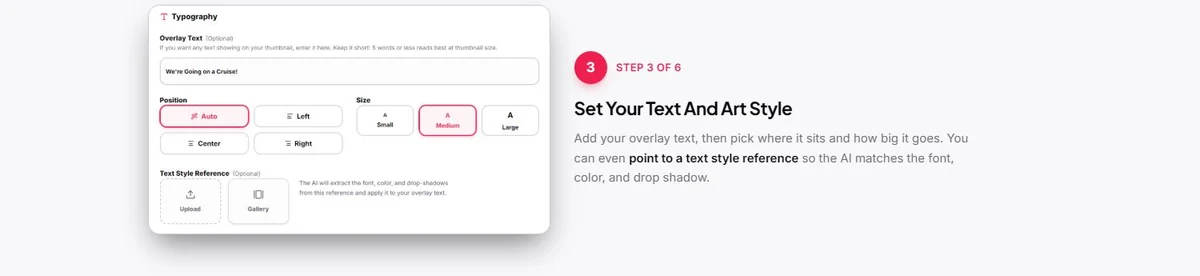
3. Set overlay text and typography
The text controls include placement and size, plus an optional text-style reference. The vendor says the AI can use the reference to match characteristics such as font appearance, color and drop shadow.
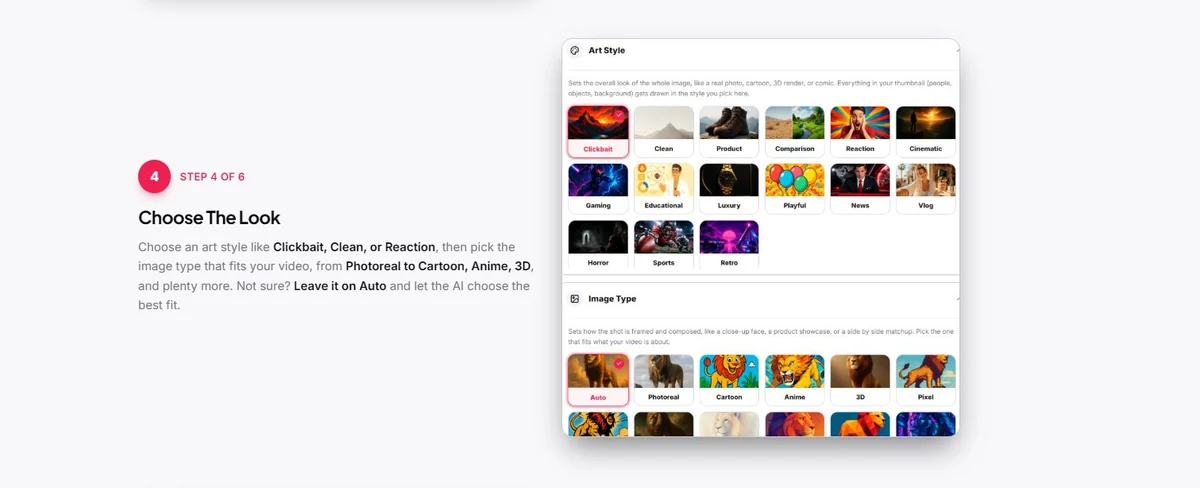
4. Choose the art style and image type
The current interface shows presets such as Clickbait, Clean, Product, Comparison, Reaction, Cinematic, Gaming, Educational, Luxury, Playful and others. Image types include choices such as Photoreal, Cartoon, Anime and 3D, with Auto available when the user does not want to decide manually.
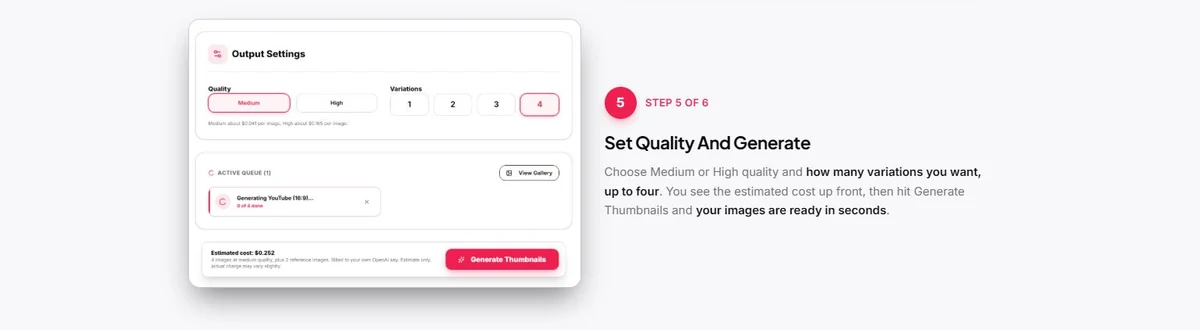
5. Choose quality and generate variations
Thumbium shows Medium and High quality choices and allows up to four variations in one request. Importantly, the interface displays an estimated generation cost before you press the button, making the separate OpenAI charge visible before the request is submitted.
6. Review the gallery
Generated versions land in the gallery, where the interface provides actions to download, rename, edit or delete an image. This is where Thumbium becomes more useful than a one-off image prompt: the workflow is designed around creating and managing multiple thumbnail candidates.

Thumbium Vendor Demo Video
The supplied video below demonstrates the product workflow. It is useful for seeing how the current product is presented, but the demonstration and any outcomes shown remain vendor-provided evidence.
Which Thumbium Features Matter Most?
Prompt-to-thumbnail generation
The core feature turns a written idea into a finished thumbnail. That sounds simple, but the advantage is that the surrounding controls are specific to thumbnail production instead of forcing users to manage a general AI-image workflow.
Connect creative to demand: If thumbnails support YouTube or social content, the Social-to-Search Content Gap Analyzer can help identify topics gaining search visibility on social platforms that deserve stronger website coverage.
Reference photos
Adding a face, product or background can be more useful than generating every element from scratch. Review channels, ecommerce creators and personal brands often need the real subject or product to remain recognizable.
Text and style references
Thumbnail tools live or die on readability. Thumbium gives users explicit overlay-text controls and a text-style reference option rather than treating the headline as an afterthought.
Up to four versions per request
Multiple candidates matter because a single AI result is rarely enough to judge a concept. The value is the ability to compare distinct options and then choose one to edit or test.
Your own OpenAI API key
Free calculator: If you want to value the time saved as well as the API/software cost, use the AI Tool ROI & Time-Savings Calculator.
This is both a feature and a buying consideration. Thumbium does not bundle a recurring pool of vendor credits; the buyer connects an OpenAI API key and pays OpenAI directly for generation. That can reduce markup but adds setup and billing responsibility.
Thumbium Pricing — and an Allowance Discrepancy Worth Noticing
Official pages checked August 26, 2026: Current public Thumbium page · Thumbium affiliate page. They agree on $17/$29/$49 pricing but currently show different monthly allowances.
The information supplied for this review lists three one-time front-end plans: Hobby $17, Business $29 and Agency $49. The supplied plan notes state monthly allowances of 50, 100 and 250 thumbnails respectively.
However, the current public Thumbium sales page now displays the same $17/$29/$49 prices with 100, 200 and 500 thumbnails per month. At the same time, Thumbium's affiliate page still shows the older 50/100/250 allowances. Because two official pages currently disagree, the safest approach is to verify the exact allowance shown on the WarriorPlus checkout/account offer before buying.
| Plan | One-time price | Current public sales page | Supplied/affiliate material |
|---|---|---|---|
| Hobby | $17 | 100/month | 50/month |
| Business | $29 | 200/month | 100/month |
| Agency | $49 | 500/month | 250/month |
Both versions describe the allowance as refreshing monthly even though the Thumbium software itself is a one-time purchase. The current public page also says allowances can stack when more than one package is purchased using the same email address.
The plan prices are consistent, but Thumbium's own pages currently show different monthly thumbnail limits.
Check Price + Unlock BonusesHow Much Does OpenAI Generation Cost?
The current public sales page gives example generation costs of about $0.04 per thumbnail at Medium quality and $0.16 at High quality. These are OpenAI usage charges, not additional Thumbium subscription fees.
At those examples, 100 Medium-quality generations would be about $4 in API usage, while 100 High-quality generations would be about $16. Actual billing can change with OpenAI pricing and the specific settings used, so treat those figures as current examples rather than permanent guarantees.
This is why “pay once” needs one extra sentence: you pay Thumbium once for the software, but you continue paying OpenAI for the images you generate.
Thumbium OTOs: Three Optional Upgrades
The supplied funnel information lists three one-time upgrades. None is required to use the core thumbnail generator.
| Upgrade | Price | What it adds |
|---|---|---|
| OTO 1 — Remixer | $27 | Takes one thumbnail and generates up to ten new variations with different colors, layouts, expressions and headlines. |
| OTO 2 — Copywriter | $29 | Generates ten title ideas, a search-oriented description and relevant tags from a thumbnail. |
| OTO 3 — Client Review | $37 | Adds private client-approval links and commercial rights for selling thumbnail services. |
For an individual YouTube creator, the core product may be enough. Remixer is the most directly related upgrade for people who want many variants. Copywriter broadens Thumbium into video metadata, while Client Review is aimed primarily at freelancers and agencies.
14-Day Guarantee and Gallery Storage
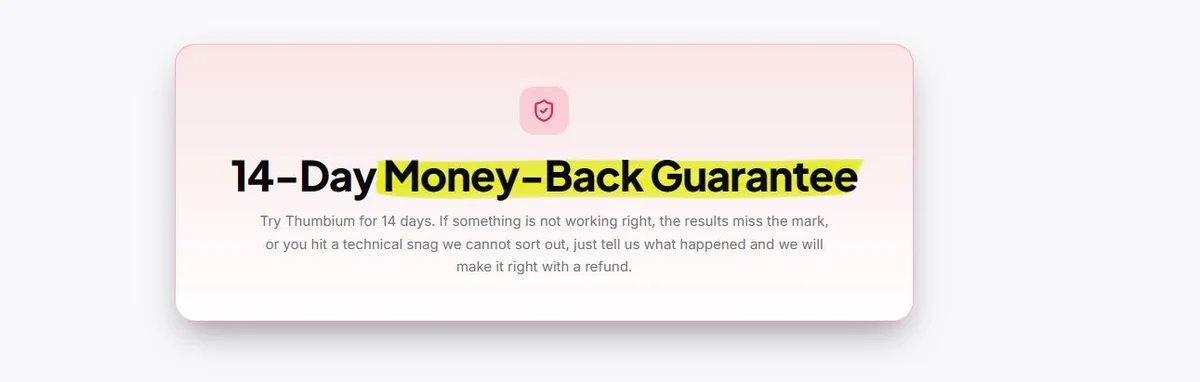
The current sales material states a 14-day money-back guarantee. The wording says buyers can request a refund if the product is not working properly, the results miss the mark or a technical problem cannot be resolved. Verify the latest wording on the official Thumbium page.
The public FAQ also says generated thumbnails remain in the gallery for 30 days before automatic deletion. That means the gallery should not be treated as permanent cloud storage; finished images should be downloaded promptly.
IM Review HQ Decision Factors
Rather than turning incomplete evidence into a numeric score, we use the factors below to show what should drive the buying decision.
| Decision factor | What the evidence shows | Buyer implication |
|---|---|---|
| Workflow speed | Purpose-built steps turn references, prompt, text and variations into a thumbnail workflow. | Useful when generating several concepts per video is the bottleneck. |
| Design control | AI generation is faster than starting from blank, but it is not a full layered design suite. | Creators needing pixel-level editing may still prefer a design editor. |
| API dependency | Thumbium requires the buyer’s OpenAI API key and separate usage billing. | One-time software pricing does not mean zero ongoing cost. |
| Allowance clarity | Official public and affiliate pages disagree about monthly generation allowances. | Verify the live allowance before checkout. |
| Creator fit | The tool focuses on thumbnails for YouTube and vertical creator formats. | Best for regular publishers; harder to justify for occasional use. |
Thumbium Strengths and Compromises
Pros
- Purpose-built thumbnail workflow instead of a blank general design canvas.
- Supports both YouTube 16:9 and vertical 9:16 formats.
- Optional subject, product and background reference photos.
- Explicit overlay-text and style controls.
- Up to four variations per generation request.
- Estimated OpenAI cost is shown before generation.
- One-time Thumbium software pricing rather than a required monthly subscription.
- 14-day money-back guarantee is clearly displayed.
Cons
- Requires an OpenAI API key and separate usage billing.
- Two official Thumbium pages currently disagree about monthly thumbnail allowances.
- Gallery storage is limited to 30 days.
- Optional OTOs can increase total purchase cost.
- AI output still needs human judgment for text accuracy, face consistency and visual hierarchy.
- A better-looking thumbnail does not guarantee higher CTR, views or watch time.
- IM Review HQ has not independently benchmarked Thumbium against competing thumbnail tools.
Alternatives Worth Comparing
These are not ranked as automatic winners. They solve overlapping jobs in different ways, so the better choice depends on which part of the workflow you actually need.
| Option | Core approach | When it may fit better |
|---|---|---|
| Thumbium | Prompt/reference-driven AI thumbnail workflow with one-time software pricing plus API usage. | Best when rapid concept generation is the priority. |
| Canva | Template-based visual design with manual control and a broad creative suite. | Consider when you want more layout control across thumbnails and other graphics. |
| Pikzels | Dedicated AI thumbnail maker focused on YouTube thumbnail generation. | Consider when comparing purpose-built AI thumbnail workflows. |
Comparison note: Competitor descriptions are based on their current public product pages. Pricing and features can change; verify them directly before switching or buying.
The Creator Profile Thumbium Fits
Good fit
Regular YouTube publishers, affiliate reviewers, creators who need several thumbnail concepts per video, marketers who use their own face or products, and freelancers comfortable with OpenAI API billing.
Probably skip it if
You publish only occasionally, do not want to manage an API key, already have a thumbnail workflow you prefer, or need a full layered design suite rather than prompt-driven generation and editing.
Thumbium Verdict: Where the One-Time Model Fits
Thumbium has a clear use case and a cleaner workflow than treating a general AI image generator as a thumbnail tool. The six-step process covers the decisions creators actually make: format, subject/reference images, prompt, text, art style, quality, variation count and final gallery management.
The pricing model is also appealing for creators who dislike recurring SaaS bills. But the one-time price does not eliminate ongoing AI costs, and the disagreement between Thumbium's current public sales page and affiliate material over monthly allowances is something buyers should verify before purchase.
Confirm the current monthly allowance and any optional add-ons on the live checkout.
Check Price + Unlock BonusesFor the broader creator workflow, see our YouTube Growth Tool Stack: What You Need in 2026.
Thumbium FAQ
Can I use my own face or product in Thumbium?
Yes. The current interface includes optional subject, product and background reference-photo inputs. Those references are intended to help the generated thumbnail preserve recognizable people, products or scenes.
How much does Thumbium cost?
The current front-end prices are $17 for Hobby, $29 for Business and $49 for Agency. These are presented as one-time software purchases. OpenAI generation usage is billed separately.
How many thumbnails do the plans include?
There is currently an official-page discrepancy. The public sales page shows 100/200/500 thumbnails per month for Hobby/Business/Agency, while supplied and affiliate material still shows 50/100/250. Verify the live offer before buying.
Do I need an OpenAI API key?
Yes. Thumbium runs generation through the buyer's own OpenAI API key. The vendor currently gives examples of about $0.04 per Medium-quality image and $0.16 per High-quality image.
Does Thumbium work for YouTube Shorts?
The interface supports 16:9 YouTube projects and vertical 9:16 projects intended for Shorts-style use.
What are the Thumbium OTOs?
The supplied funnel lists Remixer for $27, Copywriter for $29 and Client Review for $37. All three are optional.
Does Thumbium guarantee better click-through rates?
No. The sales page labels its CTR examples as illustrations rather than guaranteed results. Actual performance depends on the video, title, audience, topic and thumbnail.
What is the refund period?
The current sales material displays a 14-day money-back guarantee.