A useful YouTube growth tool stack supports the publishing loop without turning your channel into a collection of overlapping software subscriptions.
YouTube growth is not created by one piece of software. It comes from a repeatable system: choosing topics people care about, packaging each video with a strong title and thumbnail, delivering a useful video, publishing consistently and learning from the results.
The right tools make that system faster. The wrong tools add dashboards, subscriptions and busywork without improving the videos. This guide breaks the creator tool stack into the jobs that actually matter so you can decide where software is worth paying for.
Quick Takeaway
This guide is designed to help you make a practical decision, not to push the largest possible software stack. Start with the job you need done, use the smallest set of tools that supports it, and expand only when your workflow gives you a reason.
In This Guide
- Think in Systems, Not Individual Tools
- 1. Topic and Search Research
- 2. Thumbnail and Packaging Tools
- 3. Scripting and Planning
- 4. Recording and Editing
- 5. Repurposing and Short-Form Content
- 6. Publishing and Channel Management
- 7. Analytics and Improvement
- A Lean YouTube Tool Stack
- Common Creator Tool Mistakes
Think in Systems, Not Individual Tools
A tool is valuable when it improves a specific part of the publishing cycle. If you do not know which part of your cycle is weak, buying another tool is unlikely to fix it.
For example, a thumbnail tool is useful when packaging is the bottleneck. An editing tool matters when production time prevents you from publishing. A keyword tool matters when you struggle to choose topics. Analytics matter when you already have enough videos to learn from patterns.
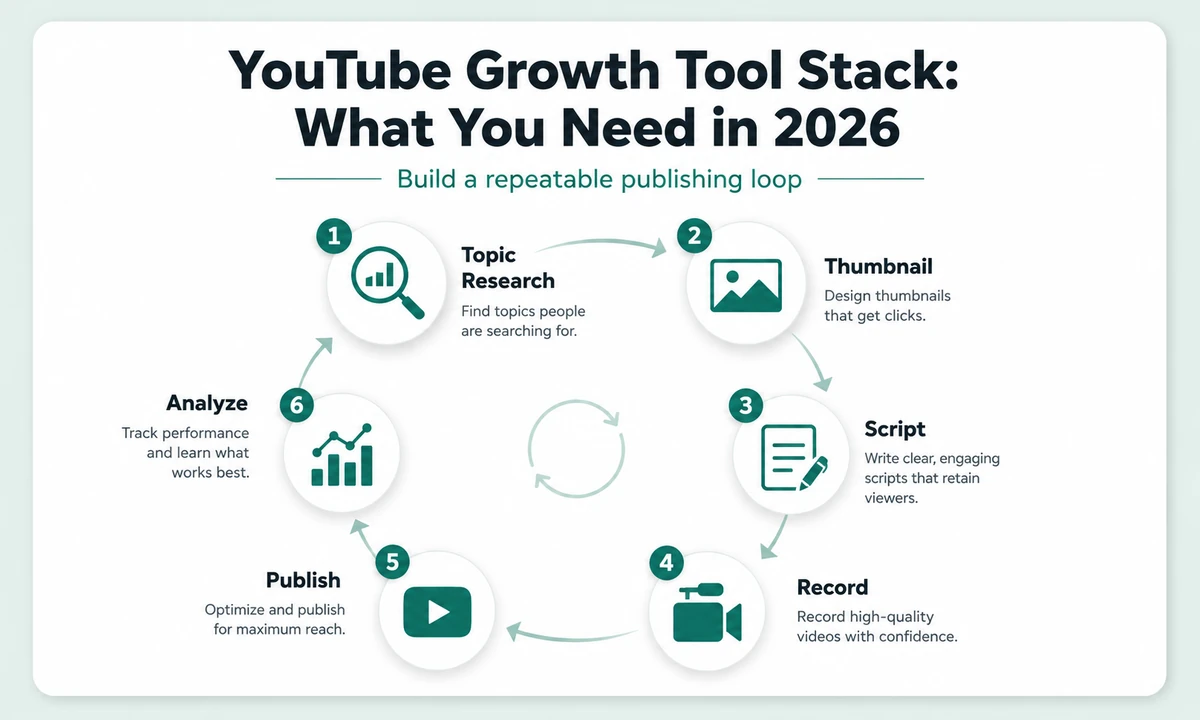
A repeatable YouTube growth loop moves from topic research and packaging through publishing and analysis.
1. Topic and Search Research
The starting point is not a keyword score. It is a topic that matches the channel's audience and can be expressed as a video someone would choose to watch. YouTube's own search suggestions, competitor channels, comments, community discussions and Google Trends can all reveal recurring questions and rising interest.
Dedicated research tools can help organize ideas, surface related terms and compare topics. Their value is speed and organization. They do not replace judgment about whether the topic fits your audience.
What to look for
- related searches and question variations;
- recent videos performing above a channel's normal baseline;
- gaps where existing videos are outdated or incomplete;
- topics that naturally lead to a strong visual promise;
- ideas you can support with real examples or demonstrations.
2. Thumbnail and Packaging Tools
The title and thumbnail determine whether a strong video gets a chance to be watched. Thumbnail software should help you create a clear visual idea quickly, compare variations and keep text readable at small sizes.
General design platforms offer maximum control and reusable templates. Specialized AI thumbnail tools can speed up ideation and image creation. The tradeoff is control: faster generation can be valuable, but creators still need to judge whether the result communicates the video's promise accurately.
For a review site like IM Review HQ, tools such as Thumbium fit this category because they are positioned around AI-assisted thumbnail creation. A separate research-based review can examine the actual feature set, pricing and limitations before making a recommendation.
| Packaging approach | Best when | Main tradeoff |
|---|---|---|
| General design editor | You want maximum manual control, reusable brand assets and broad design flexibility. | More design work and decision-making per thumbnail. |
| Purpose-built AI thumbnail tool | You want rapid concept generation and a workflow designed specifically around YouTube packaging. | Credits/API costs and less fine-grained control may matter at scale. |
| General image generator | You need custom source imagery or unusual concepts rather than complete thumbnail layouts. | You still need a separate layout/text workflow and stronger quality control. |
For concrete examples, compare our Thumbium research review with Canva's YouTube thumbnail maker. The useful question is not “which tool has more features?” but which approach removes your current packaging bottleneck without giving up needed control.
Thumbnail questions that matter more than the tool
- Can the idea be understood in one second?
- Does the visual create curiosity without misleading the viewer?
- Is important text readable on mobile?
- Does the title add information rather than repeat the thumbnail?
- Can you produce two or three meaningful variations quickly?
3. Scripting and Planning
Scripting tools can help turn a rough idea into a clear opening, sequence and call to action. AI can be useful for outlining, tightening explanations and creating alternate hooks. The risk is sameness. A script that sounds like every other AI-generated video gives viewers little reason to remember the channel.
Use tools to structure your knowledge, not replace it. Add personal observations, examples, demonstrations and specific conclusions that come from your own experience or research.
For tutorial content, write around the viewer's desired result. Show what they will accomplish, then move through the minimum steps required to get there. For reviews, make the verdict and the evidence easy to follow.
4. Recording and Editing
Production software should remove friction. Screen-recording tools are ideal for SaaS demos and tutorials. Traditional video editors provide control over timing, audio, overlays and pacing. AI editing tools can remove pauses, create captions, reframe clips and speed up repetitive editing tasks.
Choose the simplest editor that can produce the style your channel needs. A creator publishing screen tutorials does not necessarily need the same editing stack as a cinematic travel channel.
| Video type | Most important tool capability |
|---|---|
| Software tutorial | Clear screen capture, cursor visibility, zooms, clean narration |
| Talking-head education | Fast cutting, audio cleanup, captions, B-roll |
| Faceless explainer | Voice, visuals, timing, asset management |
| Short-form clips | Vertical reframing, captions, fast exports |
5. Repurposing and Short-Form Content
Repurposing tools can turn one long video into Shorts, social clips, posts, transcripts or blog drafts. This can be efficient, but avoid publishing the same idea in the same form everywhere. Each platform rewards different pacing and context.
A short clip should stand alone. A text post should explain the lesson without requiring the viewer to watch the full video. Repurposing works best when the tool creates a starting asset and you adapt it for the destination.
Products positioned around turning YouTube videos into additional marketing assets, such as TubeWizard, belong in this part of the workflow. Their value should be judged by the quality and editability of the derived content, not simply by the number of formats advertised.
6. Publishing and Channel Management
YouTube Studio remains the center of the publishing workflow. Use it to upload, schedule, manage metadata, review comments and see channel analytics. Third-party tools can add workflow conveniences, but they should not make basic publishing more complicated.
Create a repeatable pre-publish checklist: title, thumbnail, description, links, captions, end screens where appropriate, playlist, audience setting and final playback check. A checklist prevents small mistakes better than another expensive dashboard.
7. Analytics and Improvement
The most useful creator tools help you answer why a video performed the way it did. Start with the relationship between impressions, click-through behavior, early retention and overall watch patterns. Then compare those numbers across videos rather than treating one metric as the score for the channel.
Find cross-platform opportunities: The Social-to-Search Content Gap Analyzer can compare social/video search demand with website visibility so winning video topics can become stronger search content.
If a video receives impressions but few clicks, packaging may be the problem. If it gets clicks but viewers leave quickly, the opening or promise may not match expectations. If retention is healthy but impressions are limited, the topic may have a smaller audience or need more time to find viewers.
Use analytics to choose the next experiment. Change one important variable at a time when possible so you can learn from the result.
A Lean YouTube Tool Stack
A creator can start with surprisingly little:
- Research: YouTube search, Google Trends and a notes system.
- Thumbnail: one design or AI thumbnail tool.
- Script: a document editor plus optional AI assistance.
- Recording: screen recorder or camera workflow appropriate to the channel.
- Editing: one editor you can use quickly.
- Publishing and analytics: YouTube Studio.
Add specialized tools when you know the bottleneck. If thumbnails take two hours, improve that step. If editing delays publication for a week, solve editing. If you cannot choose topics, invest in research. Let the workflow tell you what to buy.
Common Creator Tool Mistakes
- Buying growth tools before developing a repeatable publishing habit.
- Using keyword scores as a substitute for understanding the audience.
- Generating thumbnails that look polished but do not communicate a clear promise.
- Over-automating scripts until the channel loses a recognizable voice.
- Paying for several tools that perform the same job.
- Watching analytics without turning the data into a specific experiment.
The Best Tool Is the One That Removes Your Bottleneck
YouTube growth comes from a better publishing loop, not from owning more software. Choose tools that make one stage measurably faster or better, then use the time saved to publish and learn.
A lean creator stack makes it easier to see what is actually working. Build the process first, then add software when the process shows you exactly where help is needed.
Choose Tools for the Stage Your Channel Is In
A brand-new channel and an established channel have different needs. Early on, the biggest advantage usually comes from learning to publish consistently and improving topic selection, packaging and delivery. Advanced dashboards are less useful when there are only a handful of videos to analyze.
| Channel stage | Main problem | Tool priority |
|---|---|---|
| 0–10 videos | Building the habit and learning production | Simple recording, editing and thumbnail tools |
| 10–50 videos | Finding repeatable topics and packaging patterns | Research plus stronger analytics |
| 50+ videos | Scaling production and learning from a larger catalog | Workflow automation, deeper analytics and repurposing |
This is not a strict rule. A tutorial channel may need screen-recording software immediately, while a short-form channel may prioritize fast captioning and vertical editing. The stage framework simply prevents you from buying tools for problems you do not yet have.
Free vs. Paid YouTube Tools
Many creators can begin with free or built-in tools. YouTube Studio provides publishing and analytics. Google Trends can help compare broader interest. Basic design and editing software often has a free tier. Paid tools become worthwhile when they save enough production time or provide data you actually use to change decisions.
Before upgrading, write down what the paid feature changes. “More keyword data” is vague. “I can compare ten topic ideas in twenty minutes instead of doing the research manually for two hours” is measurable.
Create a Thumbnail and Title Testing Habit
YouTube now provides native A/B testing for titles and thumbnails for eligible creators. You can test up to three variants, and YouTube selects the winner using watch time rather than click-through rate alone. Tests can take days and, in some cases, up to two weeks.
That changes the best workflow: create meaningfully different packaging hypotheses rather than three tiny variations. One might emphasize the result, another the problem, and a third a surprising visual. If the only change is moving text a few pixels, the test teaches you very little.
| Step | What to do | What you learn |
|---|---|---|
| 1. Define the promise | Write one sentence describing what the viewer should expect from the video. | Keeps every variant accurate to the content. |
| 2. Create 2–3 hypotheses | Use different angles, visual hierarchy or title framing—not cosmetic changes. | Tests an idea rather than decoration. |
| 3. Run the native test | Use YouTube's built-in title/thumbnail test when available. | Compares variants using watch-time outcomes. |
| 4. Record the lesson | Note what changed and whether the winner was conclusive. | Builds a channel-specific packaging playbook over time. |
Do not chase a universal CTR target. YouTube's impressions and CTR FAQ says half of channels and videos have an impressions CTR between 2% and 10%, but the number varies substantially by content, audience and where the impression appeared. Compare like with like on your own channel and avoid clickbait that wins a click but loses viewer satisfaction.
How to Evaluate a New Creator Tool
Use one current video as the test project. Record how long the task takes with your existing process, then use the new tool for the same job. Compare total time, output quality, revisions, export process and whether you would trust the result on your channel.
For AI tools, pay particular attention to control. Can you fix one bad section, or do you have to regenerate everything? Can you preserve brand elements? Can you export without watermarks? Does a credit system make repeated revisions expensive?
YouTube Tool FAQ
Do keyword tools guarantee YouTube views?
No. They can help with research and organization, but viewers still choose videos based on topic, packaging and whether the content satisfies the promise.
Is an AI thumbnail tool enough?
It can accelerate ideas and production, but you still need to judge clarity, accuracy and fit for the audience. The tool does not replace the packaging decision.
Should I use AI to write the entire script?
AI can help outline and edit, but channels are easier to distinguish when the creator adds specific experience, examples and judgment that generic generated scripts lack.
When should I add a repurposing tool?
When you are publishing enough long-form content that manually creating clips or secondary assets becomes a repeated bottleneck. If you publish one video occasionally, the extra platform may not be necessary.
Browse IM Review HQ's review section for research-based product reviews with pricing checks, evidence, tradeoffs and buyer-fit analysis.
Read our Thumbium Review for its six-step thumbnail process, one-time pricing, OpenAI costs, plan limits and OTOs.