An AI Pinterest tool stack should reduce repetitive work without turning your account into a stream of duplicate, low-context Pins. The useful stack is not “one AI tool that does everything.” It is a workflow that helps you research demand, create original assets, write accurate Pin copy, publish consistently, measure outbound traffic and decide what still deserves human review.
That distinction matters for affiliate marketers. Pinterest can send visitors to a blog, review, comparison or other destination, but an automated Pin is only the beginning of the journey. The Pin still has to match the page it links to, the page has to load cleanly, affiliate relationships need to be disclosed where required, and the final campaign has to produce a business outcome—not just impressions.
Quick Takeaway
Build the stack around six jobs: research → create → match → publish → measure → refresh. Automate repetition, not judgment. Track outbound clicks and downstream conversions, keep the Pin promise aligned with the landing page, and use AI-generated creative as material to review rather than content to publish blindly.
Related review: If you are considering an all-in-one Pinterest campaign tool, see our TrafficWave Generator 3.0 Review for current pricing, optional upgrades, vendor evidence and limitations.
In This Guide
- The Six Jobs in a Pinterest Tool Stack
- 1. Research Demand Before Generating Creative
- 2. Create Original Pins, Not Duplicate Variations
- 3. Match Pin Copy to the Destination Page
- 4. Schedule Consistently Without Automating Spam
- 5. Measure Traffic, Not Vanity Metrics Alone
- 6. Keep Affiliate Disclosure and Link Integrity in the Workflow
- IM Review HQ Pinterest Traffic Control Loop
- What AI Should and Should Not Automate
- Three Practical Stack Models
- A 30-Day Testing Plan
- Common Pinterest Automation Mistakes
- FAQ
The Six Jobs in a Pinterest Tool Stack
A tool stack is easier to evaluate when every tool has a job. That prevents buying three products that all generate captions while leaving measurement or landing-page quality untouched.
| Job | What the tool should help with | What still needs human judgment |
|---|---|---|
| Research | Trend discovery, keyword comparison, seasonal timing, topic ideas. | Whether the topic fits your audience and offer. |
| Create | Images, video concepts, layouts, text overlays and variants. | Accuracy, readability, originality and brand fit. |
| Copy | Titles, descriptions, topic phrases and calls to action. | Truthfulness, message match and affiliate context. |
| Publish | Scheduling, queues, calendars and campaign organization. | Cadence, duplication risk and whether the destination is ready. |
| Measure | Impressions, saves, Pin clicks, outbound clicks and conversion data. | Which metric actually represents business value. |
| Refresh | Finding winners, repurposing ideas and planning future creative. | Whether to expand, revise or retire the angle. |
If a tool does several jobs well, that can simplify the stack. But convenience is not the same as completeness. A system that generates and schedules 100 Pins but gives you no reliable way to judge outbound traffic can increase activity without improving decisions.
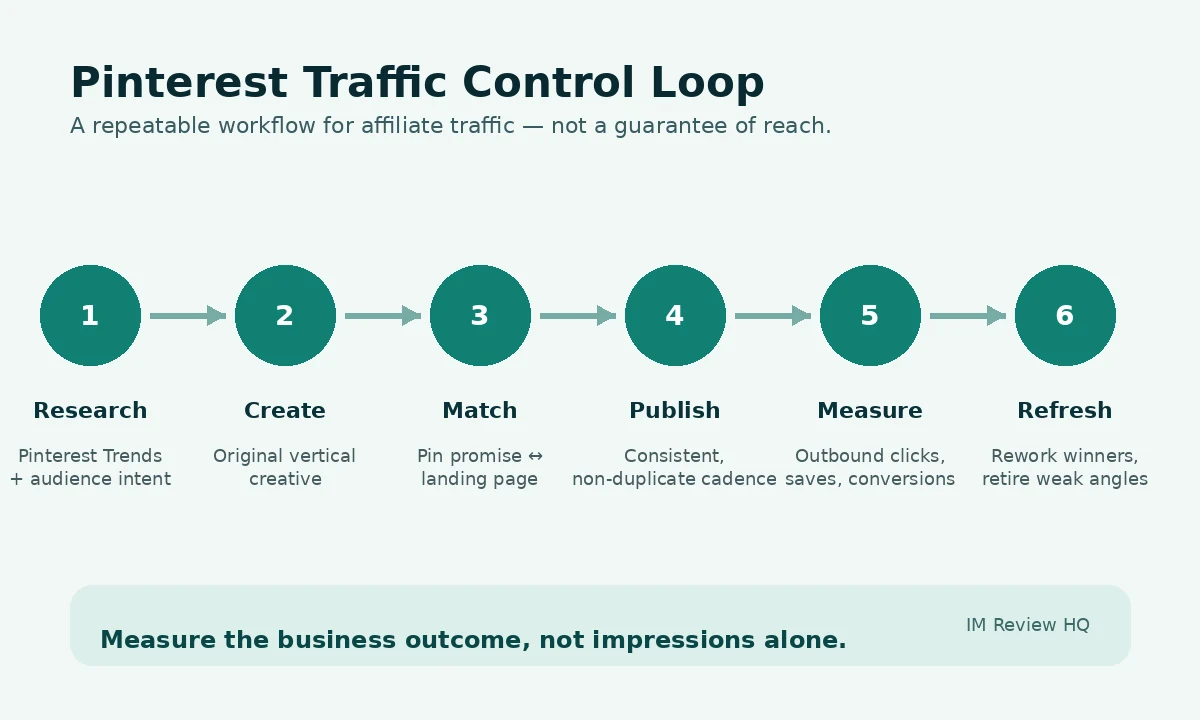
IM Review HQ workflow: automate the repeatable steps, then use traffic and conversion data to decide what deserves another cycle.
1. Research Demand Before Generating Creative
The cheapest Pin to create is the one you decide not to make. Start with demand and timing rather than asking an AI image generator for 50 random concepts.
Pinterest's current Trends tool can show historic search, save and shopping trends, including seasonal patterns and changes over time. It also allows multiple keywords to be compared on the same graph. That makes it more useful as a planning tool than simply copying autocomplete phrases. Pinterest Business Help: Pinterest Trends.
A practical research sequence is:
- Start with the page you already have. Identify its main problem, audience and commercial intent.
- Check Pinterest demand. Look for related searches, seasonality and topic patterns.
- Compare a few angles. A broad topic may be popular while a more specific decision-oriented phrase better matches your page.
- Write a Pin brief. Record the audience, promise, destination URL and one action before generating creative.
This avoids a common AI-content mistake: creating assets first and trying to invent a reason for them afterward. The Pin should begin with a real destination and a real search or discovery angle.
2. Create Original Pins, Not Duplicate Variations
AI is useful for exploring layouts, visual concepts, backgrounds and short-form copy. It is less useful when the workflow becomes “change one color and republish the same Pin 20 times.”
Pinterest's current performance guidance recommends high-quality original content, a vertical format and frequent, consistent creation. It also specifically warns against repeatedly saving duplicate Pins or uploading content that already exists, because repetitive behavior can be treated as spam. Pinterest recommends a 2:3 aspect ratio for images and emphasizes quality, relevance and original publishing. Pinterest Business Help: Pin performance and distribution.
For affiliate content, “original” does not require a completely different article for every Pin. It means the creative should give a genuinely different entry point into the same useful page. One guide might support:
- a checklist Pin focused on mistakes to avoid,
- a comparison Pin focused on two approaches,
- a process Pin showing the steps,
- a result-oriented Pin that accurately describes the outcome the page helps with, and
- a seasonal or audience-specific version if the topic genuinely changes by context.
Before publishing AI-generated graphics, inspect small text, logos, product screenshots, numbers and hands or interface elements. A beautiful Pin with inaccurate text damages trust before the visitor even reaches the site.
3. Match Pin Copy to the Destination Page
The best title generator in the world cannot rescue a mismatch between a Pin and its landing page. If the Pin promises “7 free affiliate tools” and the destination immediately pushes a paid product without delivering the list, the click was won under the wrong expectation.
Pinterest's own performance guidance says the image, text and keywords in the Pin should match the landing page and recommends linking to a page that provides clearly related additional content. It also advises checking broken links and site speed. Pinterest: linking and performance best practices.
Use AI copy generation after you define three facts:
- The exact page promise. What does the destination actually help the visitor do?
- The evidence available. Are you linking to a review, tutorial, calculator, comparison or case study?
- The next action. Read, compare, calculate, download, subscribe or visit the merchant.
A useful quality check is to place the Pin title beside the page H1. If a reasonable person would feel the two belong to different pages, rewrite the Pin.
If the destination is a conversion-focused page, our High-Converting Affiliate Landing Page guide explains message match, proof, disclosure, CTA design and mobile testing in more detail.
4. Schedule Consistently Without Automating Spam
Scheduling tools solve a real operational problem: Pinterest traffic work is easier when publishing is planned instead of dependent on remembering to post manually. But the queue should be an execution system, not a volume goal.
Pinterest recommends creating original content regularly and says business accounts can schedule Pins in advance. It also notes that Pins can gain engagement long after publication and that performance can change with language, location, seasons, formats and trends. That makes a steady testing cadence more useful than judging a Pin after a few hours. Pinterest: distribution and publishing guidance.
A good automation rule is simple: every scheduled Pin should have a reason to exist. Before it enters the queue, it should have a distinct creative angle, a working destination, a relevant board/topic and a clear measurement goal.
Automation tools can be particularly helpful when you manage multiple URLs, recurring seasonal topics or several creative formats. They become risky when “campaign” means publishing near-duplicates simply because the software can generate them.
5. Measure Traffic, Not Vanity Metrics Alone
Impressions tell you that Pinterest distributed the Pin. They do not tell you whether the traffic reached your site, read the page, joined your list or bought anything.
Free analysis tools: Use the Social-to-Search Content Gap Analyzer to find Pinterest or other social topics that deserve search-focused website content, and Which Pages Actually Make Money? to see whether that traffic contributes to conversions or revenue.
Pinterest Analytics can report impressions, engagements, saves, Pin clicks and outbound clicks. Business accounts can also review top-performing Pins and filter performance data. Pinterest Business Help: Analytics.
For an affiliate publisher, a useful measurement hierarchy is:
| Metric | What it tells you | How much weight to give it |
|---|---|---|
| Impressions | Distribution / visibility. | Useful for reach, weak as a business outcome. |
| Saves | The idea was worth keeping. | Useful signal for content resonance. |
| Pin clicks | People wanted more detail inside Pinterest. | Helpful, but not the same as site traffic. |
| Outbound clicks | People actually left Pinterest for your destination. | Core traffic metric. |
| On-site action | Engaged session, calculator use, opt-in or affiliate click. | Closer to the purpose of the page. |
| Revenue / qualified lead | The traffic produced business value. | Final decision metric where measurable. |
Claiming your website also improves attribution and lets Pinterest connect content saved from your site to your business account. Pinterest says claimed sites provide additional insight into how content from the domain is shared and linked. Pinterest Business Help: claim your website.
If you buy traffic or estimate the value of affiliate clicks, use the Affiliate Commission & Break-Even Calculator to model commission, conversion rate, refund rate and maximum break-even CPC instead of optimizing around impressions alone.
6. Keep Affiliate Disclosure and Link Integrity in the Workflow
Affiliate content adds another layer of quality control: the visitor should understand when a recommendation has a financial relationship behind it.
The FTC says material connections should be disclosed clearly and conspicuously and notes that social actions such as pins can function as endorsements. Its guidance also says disclosures should be hard to miss and placed with the endorsement message itself. FTC: Disclosures 101 for Social Media Influencers.
That does not mean every informational Pin needs the same wording. It means your workflow should identify when a Pin itself recommends or endorses a product and whether a disclosure is required in that context. Your destination page should also contain the site's normal affiliate disclosure where the recommendation and affiliate link appear.
Link integrity matters just as much. Automated campaigns should periodically verify that:
- the destination URL still works,
- the landing page still matches the Pin promise,
- the product or offer is still available,
- pricing claims in the creative have not gone stale, and
- redirects do not send the user somewhere unexpected.
IM Review HQ Pinterest Traffic Control Loop
This is an editorial workflow, not a prediction of reach or revenue. Use it to keep automation tied to evidence.
- Research: start with a real destination and current topic demand.
- Create: generate a small set of genuinely different visual angles.
- Match: verify the Pin promise, keywords and CTA against the destination page.
- Publish: schedule consistently without flooding the account with duplicates.
- Measure: prioritize outbound clicks and on-site outcomes over impression counts alone.
- Refresh: build new variants from proven themes and stop repeating weak angles.
The point of the loop is to make the stack self-correcting. A tool that generates more content should also make it easier to learn which content deserves more investment.
What AI Should and Should Not Automate
Good automation candidates
- Drafting title and description variants.
- Resizing or adapting a verified concept.
- Generating visual directions for human review.
- Organizing a publishing calendar.
- Summarizing analytics into patterns to investigate.
- Creating first-pass checklists from a known page.
Keep human review
- Claims about product results or earnings.
- Pricing, guarantees and offer details.
- Whether the Pin accurately represents the page.
- Affiliate disclosure decisions.
- Brand consistency and visual accuracy.
- Deciding whether a trend is relevant to your audience.
This is the same principle we use across IM Review HQ: AI can accelerate the work, but current facts and commercial claims still need verification.
Three Practical Stack Models
| Model | Typical workflow | Best fit | Main tradeoff |
|---|---|---|---|
| Manual-first | Pinterest Trends + design tool + native scheduling + Analytics. | Low volume, maximum control. | More repetitive work. |
| Mixed AI stack | Research + AI-assisted creative/copy + scheduler + Pinterest Analytics. | Publishers who want speed without giving one tool the whole workflow. | More tools to coordinate. |
| Integrated automation | One platform handles generation, campaign setup and scheduling, with manual QA and Pinterest Analytics. | Higher-volume Pinterest-focused marketers. | External AI costs, upgrade costs and automation quality need monitoring. |
TrafficWave Generator 3.0 is an example of the integrated model. Its pitch is to combine AI-assisted Pin creation, campaign building and scheduling. Our research-based review explains what the front end includes, where external generation costs can appear and which optional upgrades add trends, branding, Amazon and publishing features.
A 30-Day Testing Plan
This plan does not assume that 30 days is enough to “prove” a Pinterest strategy. Pinterest itself notes that Pins can gain engagement over long periods. The point is to create a disciplined first dataset.
- Days 1–3: set the measurement baseline. Claim the website if appropriate, confirm analytics access, record the destination pages and make sure every link works.
- Days 4–7: research three to five topic angles. Use Pinterest Trends and existing site content rather than starting from random prompts.
- Week 2: publish a small creative set. Use clearly different formats or promises instead of near-duplicate graphics.
- Week 3: compare outbound behavior. Identify which themes produce outbound clicks and useful on-site actions, not just impressions.
- Week 4: refresh one winning theme and one weak theme. Improve the creative or message, then keep the destination constant so the test is easier to interpret.
Keep a simple campaign log with the Pin topic, creative format, destination, publish date, outbound clicks and the on-site outcome you care about. That small dataset is more useful than a folder containing hundreds of generated assets with no performance history.
Common Pinterest Automation Mistakes
- Generating before researching. AI produces lots of creative for topics with weak or irrelevant demand.
- Publishing duplicates. Small color changes are treated as “new” content.
- Optimizing for impressions only. Distribution increases while outbound traffic remains weak.
- Sending every Pin to the homepage. The destination does not match the specific promise.
- Publishing stale commercial claims. An old price or guarantee remains inside scheduled creative.
- Ignoring mobile load speed. Pinterest specifically recommends checking site load speed and the landing-page experience.
- Automating disclosure judgment. The system inserts generic hashtags without checking whether the endorsement relationship is actually clear.
- Buying overlapping tools. Several products all generate images/copy while analytics and page quality remain underdeveloped.
The Rule to Keep
The best Pinterest automation stack is the one that makes good decisions repeatable. More Pins are useful only when the system also protects relevance, originality, link quality and measurement.
AI Pinterest Tool Stack FAQ
Do I need an all-in-one Pinterest automation tool?
No. A manual or mixed stack can work well. An integrated tool is mainly useful when the time saved in repeated creation, campaign organization and scheduling is worth the software cost and any external AI usage costs.
Can AI create all of my Pinterest Pins automatically?
It can generate drafts and variations, but every commercial or factual Pin should still be checked for accuracy, readability, landing-page match, duplicate risk and disclosure requirements before publishing.
Which Pinterest metric matters most for affiliate marketers?
There is no single metric for every campaign, but outbound clicks are more closely tied to website traffic than impressions alone. The strongest measurement goes one step further and connects Pinterest traffic to on-site actions, leads or revenue where tracking is available.
How often should I publish?
Pinterest recommends creating original content regularly and consistently, but there is no universal posting number that guarantees growth. Choose a cadence you can maintain without lowering quality or repeating near-duplicate Pins.
Should I use Pinterest Trends for every Pin?
Not necessarily. Evergreen pages may already have proven themes. Trends is most useful when choosing new angles, comparing keywords, planning seasonal content or deciding when interest starts to rise.
Can Pinterest send traffic directly to affiliate offers?
Pinterest allows links in Pins, but affiliate marketers still need to follow platform rules, merchant/network terms and applicable disclosure requirements. In many cases a useful review, comparison, guide or landing page gives the visitor more context and creates a more measurable path than a bare offer link.
Read our TrafficWave Generator 3.0 Review 2026 for current pricing, OTOs, vendor evidence, alternatives and buyer-fit analysis.
Use the free Affiliate Commission & Break-Even Calculator before assigning a traffic budget.