TrafficWave Generator 3.0 Review 2026: Pinterest Automation, Pricing & OTOs
TrafficWave Generator 3.0 is a Pinterest campaign-automation platform built around image pins, AI-assisted video pins, scheduling and repeatable “Wave” campaigns. Its strongest appeal is reducing the repetitive design and publishing work involved in maintaining Pinterest activity. The key limitation is that automation does not make Pinterest traffic instant—and some of the more convenient capabilities, including expanded AI generation and direct Pinterest publishing, sit behind optional upgrades.
TrafficWave Generator 3.0 makes the most sense when Pinterest is already part of your traffic strategy—or when you are prepared to make it one. It can reduce the work of producing and scheduling pins, but it cannot make an unsuitable niche, weak landing page or poor offer perform. The Basic/Pro front end is inexpensive; the real buying decision is whether you need the optional AI, trend, branding, Amazon, direct-publishing or agency upgrades.
What we'll examine
- What TrafficWave Generator 3.0 Does
- How the Campaign Workflow Fits Together
- Image Pins vs. AI Video Pins
- Formats and Visual Styles
- AI Generation Costs and Provider Connections
- What the Vendor's Traffic Proof Does—and Doesn't—Show
- Basic vs. Pro Pricing
- Seven OTOs Explained
- 30-Day Guarantee
- Pros and Cons
- Who Should Consider It?
- Final Verdict
- FAQ
What Does TrafficWave Generator 3.0 Actually Do?
TrafficWave Generator 3.0 is a cloud-based Pinterest automation tool. Its core workflow turns a keyword, URL or content idea into Pinterest-ready assets, then organizes those assets into scheduled campaigns. Current product material describes support for both static image pins and AI-generated video pins, along with AI-written titles, descriptions and keyword-focused copy.
The point is not merely to make one pin quickly. The product is designed around repeatable campaigns: decide what you want to promote, generate a set of visual and text assets, choose a schedule and keep publishing over time. That is more aligned with how organic Pinterest traffic typically works than the idea of publishing one viral pin and waiting for traffic.
How the TrafficWave Campaign Workflow Fits Together
Current funnel documentation describes a seven-step setup: connect supported AI providers, configure media-generation settings, connect Pinterest, create a Wave campaign, generate titles, generate descriptions and templates, then activate the campaign. The software shows an estimated generation cost before activation.
This is an important detail because the platform uses external AI generation services for some media tasks. The front-end price buys access to TrafficWave itself; it does not necessarily mean every image or video generation is free forever.
The Big Version 3.0 Feature: AI Video Pins
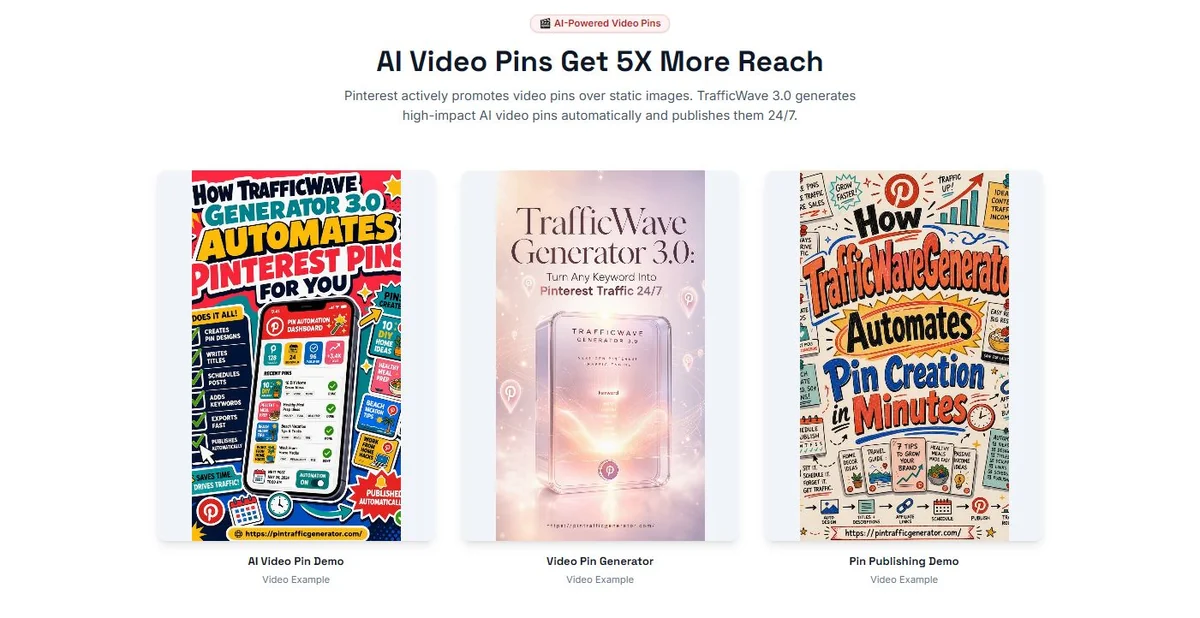
Version 3.0 places heavy emphasis on video-pin generation. Vendor materials argue that motion content receives more visibility and engagement than static pins. We would not treat the exact multipliers shown on the sales page as guaranteed or universally applicable, but the ability to generate both formats gives users something practical to test on their own Pinterest accounts.
Vendor Demonstration Video
The video below was supplied by the TrafficWave Generator vendor. It is useful for seeing how the product and Pinterest workflow are presented, but the demonstration and any outcomes shown remain vendor-provided evidence.
The screenshots show several styles of video content rather than a single template. That can be useful for affiliate marketers, bloggers and ecommerce sellers who want to repurpose existing URLs or product ideas into Pinterest-native creative without manually editing video for every pin.
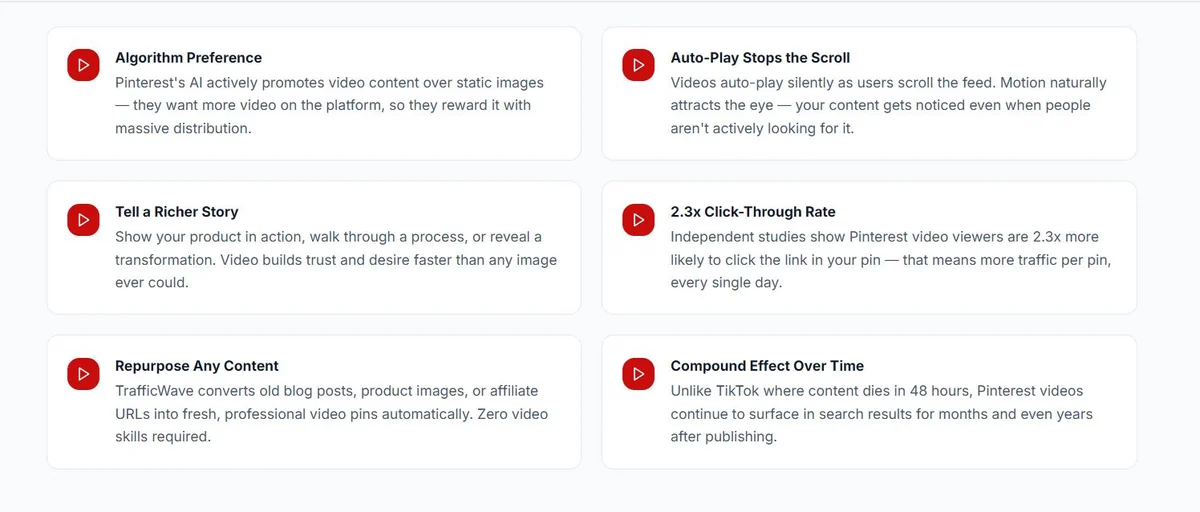
Claims such as “2.3x click-through rate,” “5x reach” or algorithm preference should be viewed as vendor marketing claims unless independently validated for your niche and account. The useful feature is the format flexibility; the performance outcome still needs real campaign data.
Pin Formats and Visual Styles
One of the more concrete parts of the current offer is the range of content formats and style directions. Vendor material shows options such as infographics, how-to pins, comparisons, checklists, product showcases, gift guides, recipe cards and seasonal content, paired with visual styles ranging from photorealistic and editorial to watercolor, flat design, anime, vintage and 3D-rendered looks.
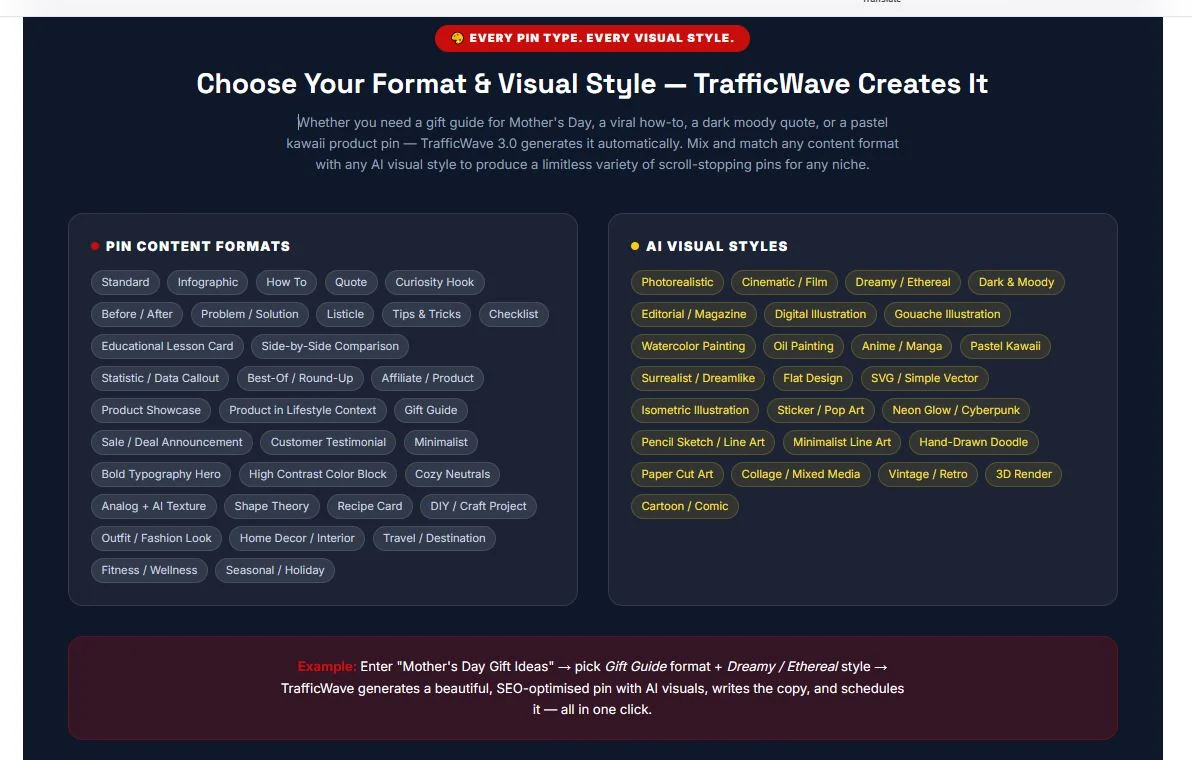
This breadth matters more than a raw template count because Pinterest accounts usually need variation. The tradeoff is editorial control: generated visuals still need to be checked for text errors, awkward imagery, brand consistency and whether they accurately represent the linked content.
AI Providers and Generation Costs
Current funnel documentation lists integrations with services such as ChatGPT, Kling, Runway, AtlasCloud and RunPod. Those integrations can power different image and video workflows. The product reportedly displays estimated AI generation costs before a campaign is activated, which is useful because video generation can be more expensive than text or static-image generation.
That also means buyers should avoid comparing TrafficWave only by its one-time software price. Your real cost can include external AI generation, depending on the provider, model, number of assets and how many times you regenerate creative.
OTO 2, AI Generation PRO, is marketed partly around larger media output and lower generation costs through discounted AI credits. That makes the upgrade potentially relevant for heavy users, but less important for someone who plans to publish a modest number of pins.
What the Vendor's 14-Day Traffic Example Shows
The vendor sales page includes an example described as a brand-new Pinterest account with zero followers that reached 487 impressions and a peak of 247 daily views after 14 days. The page itself includes a disclaimer that results vary.
Analyze your own traffic: For Pinterest and other social publishing campaigns, use the Social-to-Search Content Gap Analyzer to identify topics that can cross over into search content, and the GSC vs GA4 Traffic Reconciliation Analyzer to check whether measured search traffic is being undercounted.
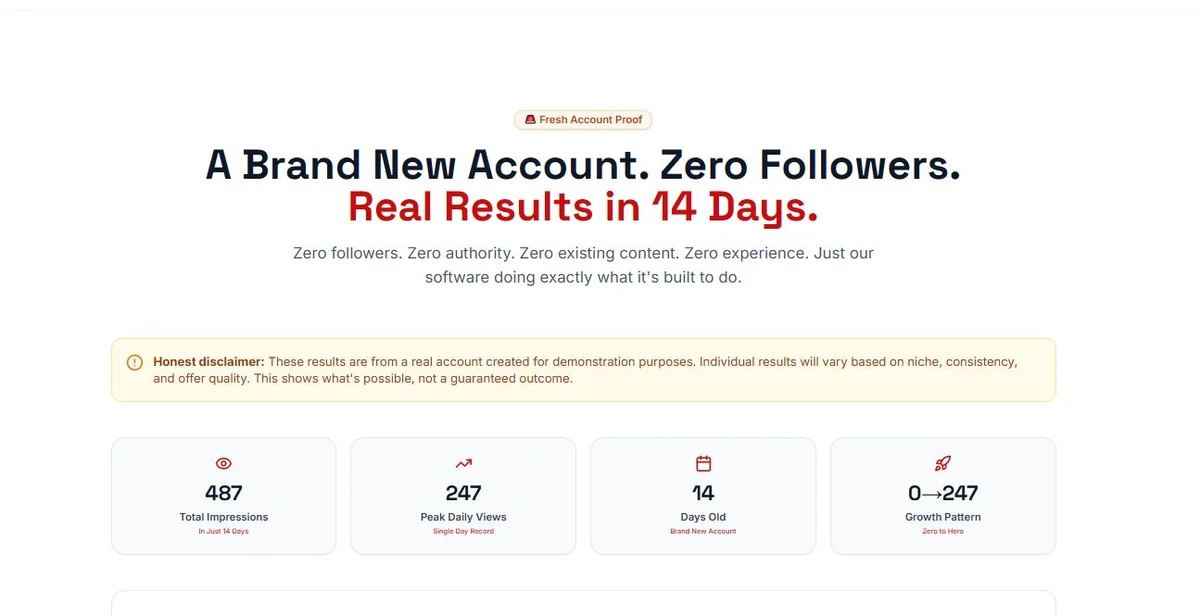
That screenshot is more useful as an example of what the vendor says happened than as a forecast. It does not tell us the niche, exact pin volume, click-through rate, downstream conversions or whether similar growth continued. For buyers, the better success metric is not impressions alone: track outbound clicks, engaged sessions, opt-ins or sales from Pinterest over several weeks or months.
TrafficWave Generator 3.0 Pricing: Basic vs. Pro
The live public TrafficWave page currently lists Basic at $37 one-time and Pro at $47 one-time. Older official JV documentation still lists Basic at $27 and Pro at $37. Because the live buyer-facing page is closer to the current transaction, we use $37/$47 as the primary pricing reference.
| Front-end plan | Live public price | Published limits |
|---|---|---|
| Basic | $37 one-time | 10 image + 10 video templates, 1 Pinterest account, 1 campaign at a time, 7-day scheduling |
| Pro | $47 one-time | 20 image + 20 video templates, 5 Pinterest accounts, 5 simultaneous campaigns, 30-day scheduling, commercial license and advanced features |
Price discrepancy verified August 26, 2026: Live TrafficWave sales page — $37/$47 · Official JV document — older $27/$37. Use the live checkout as the final authority.
Launch/JV documents can lag behind the buyer-facing sales page. Confirm the WarriorPlus amount before paying.
Check Price + Unlock BonusesTrafficWave Generator 3.0 OTOs
Free calculator: Add the front-end price and optional upgrades to our OTO Funnel Total Cost Calculator to see the full funnel cost over time.
OTO source: Official TrafficWave JV document. Use it to map the funnel, but verify individual upgrade prices at checkout.
The funnel contains seven optional upgrades. They are not all necessary for every user, and one of them introduces a recurring monthly fee. Understanding the upgrade map before purchase is more useful than treating the $37–$47 live front end as the entire possible cost.
| Upgrade | Published price | What it is for |
|---|---|---|
| OTO 1 — DFY Suite | $27 one-time | Prebuilt campaign assets, landing pages, prompt packs and affiliate-offer page tools |
| OTO 2 — AI Generation PRO | $37 one-time | Expanded AI image/video generation, editing, Canva import and media features |
| OTO 3 — Trends Launchpad | $37 one-time | Trend discovery, momentum data and trend-based campaign building |
| OTO 4 — Design & Branding PRO | $27 one-time | Brand controls, campaign cloning, larger media storage and expanded scheduling |
| OTO 5 — Amazon Associates PRO | $37 one-time | Amazon-focused product discovery and Pinterest affiliate campaigns |
| OTO 6 — TrafficWave Club | $27/month | Ongoing templates, prompts, offers, training, priority support and direct Pinterest API publishing |
| OTO 7 — Agency License | $97–$197 one-time | Client accounts, commercial licenses, white-label reporting and agency resources |
The OTO detail that matters most
TrafficWave Club is the only clearly recurring upgrade in the current funnel material. It is also where the materials place direct Pinterest API publishing. The same funnel description says the standard version may rely on CSV export/upload instead. That is an important workflow difference to understand before assuming the base purchase handles every part of publishing automatically.
For many buyers, the Pro front end may be enough to learn the platform. OTO 2 makes more sense for heavy AI generation; OTO 3 for trend-led campaigns; OTO 5 for Amazon affiliates; and OTO 7 only for people selling Pinterest services to clients.
30-Day Money-Back Guarantee
The current vendor materials promote a 30-day money-back guarantee. The guarantee screenshot says users can set up a campaign, create image and video pins and use the system during the period, then contact support if they are not satisfied. The live public page also displays a 30-day guarantee: official TrafficWave page.

Read the live WarriorPlus checkout and support terms before purchase, especially if you add recurring TrafficWave Club access or an agency license.
IM Review HQ Decision Factors
Rather than turning incomplete evidence into a numeric score, we use the factors below to show what should drive the buying decision.
| Decision factor | What the evidence shows | Buyer implication |
|---|---|---|
| Pinterest specialization | The workflow is built around Pinterest campaigns, images, video pins and scheduling. | Stronger fit than a generic social tool if Pinterest is a core traffic channel. |
| Publishing method | Direct API publishing is associated with the recurring TrafficWave Club in funnel material. | Confirm whether your chosen tier uses direct publishing or export/upload. |
| AI usage cost | Generation can introduce separate AI costs depending on provider and usage. | Model software and generation costs together. |
| Account scale | Basic and Pro differ materially in accounts, concurrent campaigns and scheduling horizon. | Pro is more relevant to multi-account or commercial users. |
| Evidence quality | Traffic examples and revenue projections are vendor examples. | Judge the workflow separately from income claims. |
TrafficWave Benefits and Limitations
Pros
- Focused specifically on Pinterest rather than trying to automate every social network.
- Supports both static-image and AI-assisted video-pin workflows.
- Large range of pin formats and visual-style directions.
- Low one-time front-end pricing compared with many recurring social-media tools.
- Pro tier expands account and campaign limits without a mandatory monthly subscription.
- 30-day guarantee is clearly promoted in current vendor materials.
Cons
- Pinterest traffic usually requires consistency and time; “autopilot traffic” language can create unrealistic expectations.
- External AI generation can add usage costs beyond the software purchase price.
- Older JV material conflicts with the live $37/$47 public pricing, so the current checkout should be verified before purchase.
- Direct Pinterest API publishing appears tied to the recurring TrafficWave Club upgrade in current funnel material.
- Vendor engagement and traffic claims have not been independently verified by IM Review HQ.
- Generated visuals and copy still require quality control before publishing.
Alternatives Worth Comparing
These are not ranked as automatic winners. They solve overlapping jobs in different ways, so the better choice depends on which part of the workflow you actually need.
| Option | Core approach | When it may fit better |
|---|---|---|
| TrafficWave Generator 3.0 | Pinterest-specific AI creation, campaign building and scheduling. | Best when you want a purpose-built Pinterest campaign workflow. |
| Tailwind | Pinterest creation/scheduling and SmartSchedule workflow. | Consider when scheduling, spacing and publishing infrastructure are the priority. |
| Manual Canva + Pinterest workflow | Create assets separately and schedule/publish through your own process. | More manual, but avoids a specialized campaign system. |
Comparison note: Competitor descriptions are based on their current public product pages. Pricing and features can change; verify them directly before switching or buying.
Best-Fit TrafficWave Users
Good fit
Affiliate marketers, bloggers, ecommerce sellers and creators who have content or offers suited to Pinterest and want to reduce the repetitive work of creating and scheduling visual posts.
Skip or simplify if
Your audience is not active on Pinterest, you need immediate paid-style traffic, you already have a mature Pinterest production system, or you do not want to manage external AI-generation costs and optional upgrades.
TrafficWave Generator 3.0 Verdict: Best Fit and Biggest Caveat
TrafficWave Generator 3.0 has a clear use case: make repeated Pinterest publishing easier. The most meaningful Version 3.0 additions are the broader AI media workflow, video pins, more visual formats and upgrade path for trends, branding, Amazon campaigns and agency use.
Its weakness is not the concept; it is the temptation to interpret automation as guaranteed traffic. Pinterest remains a distribution channel that rewards relevant content and consistent execution. Buyers should also price the system based on the features they will actually use, including external AI generation and any recurring Club membership.
Verify the live front-end price and whether any upgrade you select is one-time or recurring.
Check Price + Unlock BonusesFor a broader view of where traffic software fits, see our Affiliate Marketing Tool Stack for Beginners in 2026.
TrafficWave Generator 3.0 FAQ
Does the base version publish directly to Pinterest?
Current funnel material places direct Pinterest API publishing in the optional TrafficWave Club upgrade and indicates the standard workflow may use export/upload steps. Verify the live offer because publishing features can change.
How much does TrafficWave Generator 3.0 cost?
The live public sales page currently lists Basic at $37 and Pro at $47 one-time. Older official JV material lists $27/$37, so verify the live WarriorPlus checkout before purchasing.
Does TrafficWave Generator create video pins?
Yes. AI-assisted video-pin creation is one of the major Version 3.0 features promoted by the vendor.
Are there monthly fees?
The Basic and Pro front-end plans are presented as one-time purchases. TrafficWave Club, an optional OTO, is listed at $27 per month. External AI-generation costs may also apply depending on your providers and usage.
What are the TrafficWave Generator OTOs?
The current funnel lists DFY Suite, AI Generation PRO, Trends Launchpad, Design & Branding PRO, Amazon Associates PRO, TrafficWave Club and an Agency License.
What is the refund period?
The vendor currently promotes a 30-day money-back guarantee. Check the current WarriorPlus terms for the exact process and coverage.