A practical affiliate marketing tool stack for beginners should stay small: a website, content workflow, email list, affiliate-link system and basic analytics.
Affiliate marketing can look far more complicated than it needs to be. New marketers are shown keyword suites, funnel builders, AI writers, link trackers, page builders, automation platforms, social schedulers and dozens of “must-have” products before they have earned their first commission.
The better approach is to build the smallest tool stack that lets you publish useful content, attract an audience, collect contacts, measure what works and manage affiliate links responsibly. You can add specialized software later when a real bottleneck appears. This guide shows what a beginner actually needs, what is optional and what can usually wait.
See our CommissionOS Review 2026 for its current $47 front-end offer, AI campaign workflow, five upgrades and limitations.
Quick Takeaway
This guide is designed to help you make a practical decision, not to push the largest possible software stack. Start with the job you need done, use the smallest set of tools that supports it, and expand only when your workflow gives you a reason.
Free planning tool: Model commission, EPC, traffic costs and break-even with the Affiliate Commission & Break-Even Calculator.
In This Guide
The Five-Part Beginner Stack
Free stack calculator: Add monthly, annual and lifetime software to the Marketing Tool Stack Cost Calculator to see the combined 1-, 3- and 5-year cost.
A beginner does not need twenty tools. The core stack has five jobs: a place to publish, a way to create useful content, a way to keep in touch with visitors, a way to manage affiliate links and a way to measure results. Everything else should justify itself by making one of those jobs significantly easier.
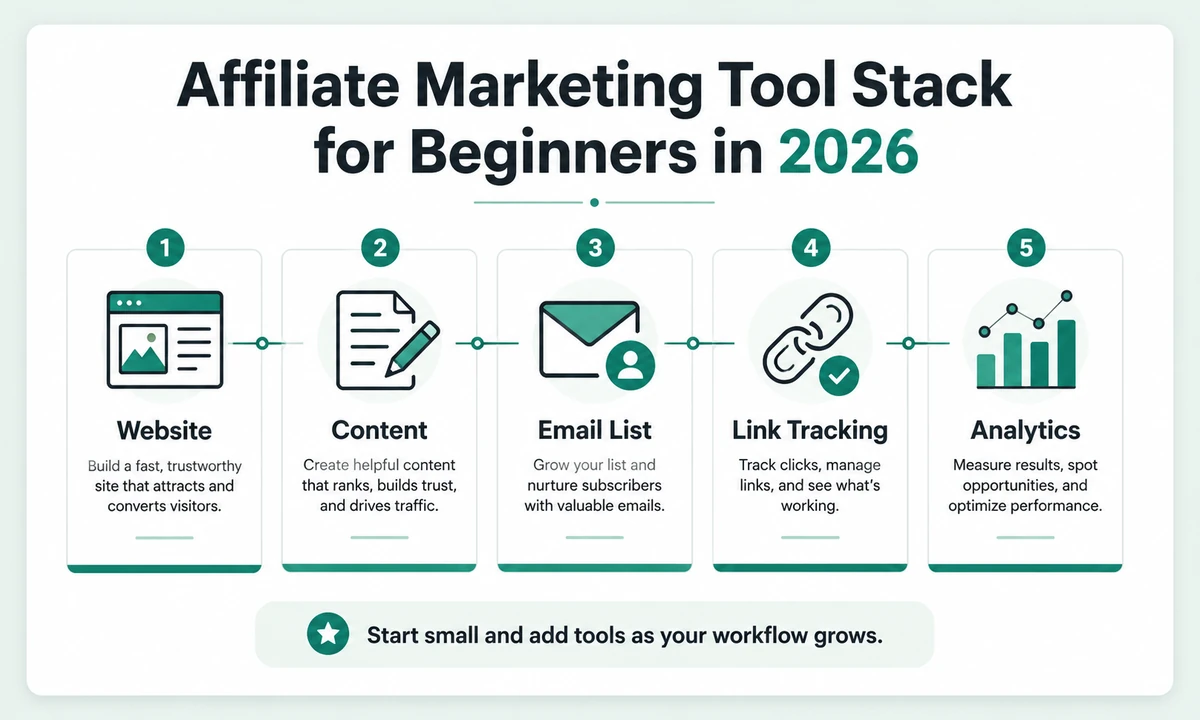
A lean beginner stack starts with five core jobs: website, content, email, link tracking and analytics.
1. A Website You Control
Social media can send traffic, but a website gives you a stable home for reviews, comparisons, tutorials and resource pages. It also gives you control over internal linking, disclosures, navigation, structured content and the user experience around affiliate links.
The platform matters less than reliability and ease of maintenance. WordPress remains flexible for content-heavy sites, while static hosting can be fast and simple when you are comfortable managing files. Whatever you choose, prioritize HTTPS, mobile usability, clean URLs, backups and a structure you can maintain.
Start with a small number of categories. A site about marketing software does not need thirty empty categories on day one. Create a category only when you have enough useful content to make the page worthwhile.
2. A Content and Research Workflow
Your content system should help you answer real buying questions rather than simply produce more words. For a review site, useful research often includes the official product page, pricing, documentation, refund terms, feature limitations, alternatives and evidence that supports your conclusions.
A simple workflow can be enough:
- Choose a tightly relevant topic.
- Identify the reader's decision or problem.
- Collect primary product information and credible supporting sources.
- Create an outline around the decision, not around a fixed SEO template.
- Write the article, then remove repetitive or generic sections.
- Add useful images, tables and internal links.
- Verify every factual claim that can change.
AI can assist with organization, formatting and editing, but it should not invent product experience, results or screenshots. For affiliate content, credibility compounds over time.
3. An Email List
An email list gives you a way to reach interested readers again without depending entirely on search or social algorithms. You do not need a complex automation system to begin. A basic form, a useful lead magnet, a welcome sequence and a regular newsletter are enough.
Your lead magnet should solve a problem closely connected to the content that attracted the visitor. Someone reading about affiliate tools might want a beginner tool checklist, while a reader researching email platforms might prefer a deliverability checklist or campaign planning worksheet.
Keep the first automation simple: deliver the resource, explain what subscribers can expect, send one or two useful follow-up messages and then move people into your normal newsletter. Complexity is only valuable when you have enough subscribers and data to justify it.
4. Affiliate Link Management
Affiliate links need to be accurate, maintainable and clearly disclosed. You should know which page contains each important link so you can update destinations when a merchant changes a URL or closes a program.
Do not turn every sentence into a call to action. The article should first help the reader make a decision. Place affiliate links where they are useful: after the quick verdict, around pricing or plan information, and near the final recommendation.
Use the appropriate sponsored link relationship for compensated links. Also keep a simple record of merchant, destination URL, network, commission type and the pages where the link appears.
5. Basic Analytics
You need enough measurement to answer a few questions: Which pages get impressions? Which pages get clicks? Which queries bring people in? Which affiliate links receive clicks? Which email forms convert visitors into subscribers?
Free traffic diagnostics: Once you have enough data, use the Traffic Drop Root-Cause Analyzer when organic traffic falls, the Zero-Click Traffic Loss Analyzer when visibility holds but CTR weakens, the GSC vs GA4 Traffic Reconciliation Analyzer to check measurement gaps, and Which Pages Actually Make Money? to separate high-traffic pages from pages that actually drive revenue.
At the beginning, Google Search Console plus a basic analytics setup can provide most of what you need. Affiliate networks provide conversion data on their side. Avoid buying sophisticated dashboards before you have enough traffic to make the extra detail useful.
| Question | Basic tool/data source |
|---|---|
| Is Google finding my pages? | Google Search Console |
| Which queries show my pages? | Search Console Performance |
| What do visitors do on site? | Web analytics |
| Which affiliate links get clicks? | Link tracking or tagged outbound events |
| Which offers convert? | Affiliate network reporting |
Tools That Are Useful but Not Essential
Keyword research suites, rank trackers, heatmaps, advanced funnel builders, social schedulers and automation platforms can all be useful. They become worth paying for when they solve a problem you can already see.
For example, a dedicated rank tracker is useful when you have enough ranking pages that checking changes manually becomes inefficient. A funnel builder becomes more valuable when you are running campaigns that require multiple landing pages and conversion steps. A social scheduler matters when social publishing is an established traffic channel rather than an experiment.
Three Realistic Budget-Stack Scenarios
There is no universal “correct” monthly tool budget. The ranges below are planning envelopes, not industry benchmarks. Their purpose is to show what should earn a place in the stack at different stages.
| Stage | Planning envelope | Prioritize | Delay until needed |
|---|---|---|---|
| Proof of concept | $10–$30/mo | Domain/hosting, basic email, free analytics, essential publishing | Premium SEO suites, automation bundles, duplicate AI subscriptions |
| Consistent publishing | $50–$120/mo | Reliable email, useful research/content tools, backups, link management | Team features, expensive funnel software, high-volume automation |
| Scaling a proven workflow | $150+/mo | Tools that save measured time, improve conversion or support more output | Anything that cannot be tied to a recurring bottleneck or measurable result |
A stack can cost less or far more than these examples. What matters is whether each recurring charge has a job. Before adding another subscription, model the combined 1-, 3- and 5-year cost with the Marketing Tool Stack Cost Calculator.
How to Build the Stack on a Budget
Use free tiers and simple systems first, but do not choose free software solely because it costs nothing. Switching costs can be real. If an email platform becomes central to your business, moving thousands of subscribers later can be more painful than paying for the right platform earlier.
A sensible spending priority is usually: reliable website and domain first, email capability second, then specialized tools that directly support a traffic source or content process that is already working.
Compliance Is Part of the Tool Stack
Affiliate disclosure is not a plugin you can bolt on at the end. The FTC's current endorsement guidance says material connections should be disclosed clearly and conspicuously. Build disclosure placement into your publishing templates rather than relying on memory.
Tool consolidation can also reduce complexity. For example, systeme.io combines several website, funnel, email and course functions in one platform. That does not make it the right choice for everyone, but it illustrates the tradeoff: fewer subscriptions and integrations versus less freedom to choose a best-of-breed tool for each job.
| Before adding a tool | Ask |
|---|---|
| New subscription | Does an existing tool already do 80% of this job? |
| New automation | Will it save recurring work, or create another system to monitor? |
| New analytics product | What decision will change because of the additional data? |
| New funnel platform | Is there enough traffic and conversion data to justify optimizing the funnel yet? |
Common Beginner Tool Mistakes
- Buying before publishing. A tool stack does not replace a useful website.
- Collecting overlapping software. If two tools solve the same job, choose one until you have a reason to add another.
- Choosing tools because affiliates promote them. Buy for your workflow, not for the bonus package.
- Ignoring recurring costs. A collection of $20–$50 subscriptions can quietly become a major monthly expense.
- Automating before understanding the task. Manual work teaches you what should eventually be automated.
- Tracking vanity metrics. Rankings and traffic matter, but revenue and subscriber growth tell you whether the system is useful.
A 90-Day Tool Roadmap
Days 1–30: Build the foundation
Set up the site, analytics, Search Console, disclosures and one email capture path. Publish a small number of high-quality pages rather than filling the site with thin content.
Days 31–60: Learn from real data
Watch which pages earn impressions and which topics attract clicks. Improve internal linking, expand useful sections and identify what readers appear to care about.
Days 61–90: Add tools only where the workflow demands them
If content production is the bottleneck, improve that part of the stack. If email signups are growing, improve your email workflow. If traffic is increasing, add better link tracking and conversion measurement. Spend in response to evidence.
The Beginner Rule
Every paid tool should answer one question: What recurring problem does this remove? If the answer is unclear, wait.
A small, understandable stack gives you room to learn what actually drives results. Build the business first. Let the tool stack grow around it.
What Should You Pay for First?
If the budget is limited, pay first for the parts of the business that create ownership and reliability. A domain and dependable hosting are usually more foundational than a premium research tool. An email service becomes more important once you are actively collecting subscribers. Specialized SEO or automation software can come later.
Think in layers. Layer one is infrastructure: domain, site and basic measurement. Layer two is audience: content, email and traffic. Layer three is optimization: better research, link tracking, automation and conversion tools. Buying layer-three software before layer one is working usually creates complexity without leverage.
A Practical Review-Site Workflow
If your affiliate site publishes product reviews, build a repeatable editorial workflow before expanding the software stack. A strong workflow might look like this:
- Choose a product that fits the site's main categories.
- Define the buying question and the evidence you need to verify before writing the review.
- Collect official product information, pricing, screenshots and documentation.
- Identify the buyer's main questions and likely alternatives.
- Draft the review around the decision rather than the vendor's sales-page order.
- Check every price, limitation and commercial claim.
- Add a clear affiliate disclosure and sponsored link attributes where appropriate.
- Publish, internally link and update when the product changes materially.
This process does not require a large number of tools. It requires discipline. A spreadsheet or simple database can track review status, price-check date, affiliate network, target category and last update until the volume becomes large enough to justify a dedicated system.
Do Not Ignore Security and Backups
Affiliate sites depend on access to domains, hosting, analytics, email accounts and affiliate networks. Protect those accounts with unique passwords and multi-factor authentication where available. Keep backup codes somewhere secure and separate from the device you use every day.
Back up site content before major design or hosting changes. If your site is stored in a repository, use version history. If you publish through a CMS, confirm that backups actually restore. Recovery is a tool category beginners rarely think about until they need it.
When Is It Time to Upgrade the Stack?
Upgrade when a bottleneck is measurable. If a free keyword tool limits research several times each week, a paid tool may save enough time to matter. If link updates are becoming difficult to track across dozens of pages, a better management system may be justified. If your email list is growing and basic automations are no longer enough, then advanced segmentation can become worthwhile.
The signal is repeated friction, not fear of missing out. Write down the problem before buying. After thirty days, check whether the new tool actually reduced that problem.
Beginner Affiliate Tool FAQ
Do I need an expensive SEO suite?
No. It can be useful, but a beginner can learn a great deal from Search Console, manual SERP research and a smaller keyword tool. Upgrade when better data will change what you publish.
Do I need a funnel builder?
Not for a basic review site. A simple landing page and email form can be enough until you are running dedicated campaigns that need multiple steps.
Related guide: If you are ready to build a campaign page, use our high-converting affiliate landing page framework to plan the message, CTA, evidence and testing.
Should I buy lifetime software?
Only when the product solves a recurring need and the terms are clear. A low one-time price is not a bargain if the tool never becomes part of the workflow.
How many affiliate programs should I join?
There is no useful target number. Join programs for products that fit the audience and content you can cover well. A smaller set of relevant offers is easier to maintain.
Browse IM Review HQ's review section for research-based product reviews with pricing checks, evidence, tradeoffs and buyer-fit analysis.
See our TrafficWave Generator 3.0 Review for its image/video-pin automation, current pricing, seven-upgrade funnel and important AI-cost considerations.
Our Bonus Builder AI Review looks at its product-specific bonus generation, branded bonus pages, current pricing and upgrade funnel.
Use our Content Marketing Tools & Content Strategy Software guide to connect planning, research, publishing, distribution and analytics.