Rebrand My PLR Review 2026: Fast Document Rebranding Without Uploading Your Files?
Short answer: Rebrand My PLR is a browser-based document rebranding tool for marketers who already have Word, text, Markdown or saved web-page content and want to turn it into a more polished branded PDF without manually rebuilding every page. The strongest parts of the current offer are local browser processing, automatic document structure repair, reusable branding, link replacement and multiple export options. The main limitations are equally clear: it does not import PDF files, the optional AI helpers require your own API key, and the current purchase is sold as a final-sale digital product.
Research conclusion: Rebrand My PLR makes the most sense when the bottleneck is presentation rather than writing. If you already have useful content but keep postponing the cover, contents page, page styling, branding and link cleanup, the product's focused workflow addresses that exact job. It is a weaker fit if your source material exists only as PDFs, if you want a cloud collaboration platform, or if you prefer to design every page manually.
Table of Contents
What Is Rebrand My PLR?
Rebrand My PLR is a browser-based document makeover tool designed for people who sell, give away or repurpose written digital products. The current product page positions it around a simple problem: useful PLR packs, reports, guides and AI-written documents often remain unfinished because turning plain text into something that looks like a finished product takes additional design and formatting work.
The software is intended to shorten that last step. You load a supported source file, apply a saved brand style, correct the document structure when needed, replace links, add a closing offer and export the result. The current site says the core application runs inside the browser rather than uploading the source document to a server.
This is narrower than a general design platform, and that focus is part of the appeal. Rebrand My PLR is not trying to be a full graphics suite, writing assistant, website builder and checkout system. Its job is to take an existing document and package it more professionally.
Rebrand My PLR Quick Overview
| Product | Rebrand My PLR |
|---|---|
| Category | PLR rebranding and digital product packaging |
| Best for | PLR sellers, lead-magnet creators, ebook/report publishers and marketers repurposing existing documents |
| Supported inputs | Word (.docx), plain text, Markdown and saved web pages |
| Current listed price | $47 one-time promotional price; regular price shown as $97 |
| Core processing | Runs inside a modern web browser; current product page says documents are not uploaded |
| Optional AI | Uses the buyer's own OpenAI, Anthropic, Google or OpenRouter API key |
| Refund policy | All sales final and non-refundable except where required by law |
| Review type | Research-based with ownership disclosure |
What We Reviewed for This Article
For this review we checked the current Rebrand My PLR sales page, current price and refund wording, the product screenshots supplied with the live offer and the documented demonstration workflow. The screenshots below are official product images from the Rebrand My PLR deployment rather than images copied from another review site.
Primary verification: Pricing, supported inputs, privacy wording, export options and refund terms were checked against the current Rebrand My PLR product page on September 25, 2026.
How the Rebrand My PLR Workflow Works
The current offer describes a three-step process: load a document, choose the look and export the finished version. Supported inputs include Word documents, plain text, Markdown and saved web pages. That makes the workflow particularly relevant to PLR packs and AI-assisted drafts because those formats are commonly available before the content ever becomes a PDF.
Once the document is loaded, Rebrand My PLR applies the chosen branding and page treatment. The current product page lists five cover styles, 14 cover backgrounds and eight fonts, along with the ability to use custom brand colors and a logo. Brand settings can be saved so repeat documents do not have to be restyled from scratch.
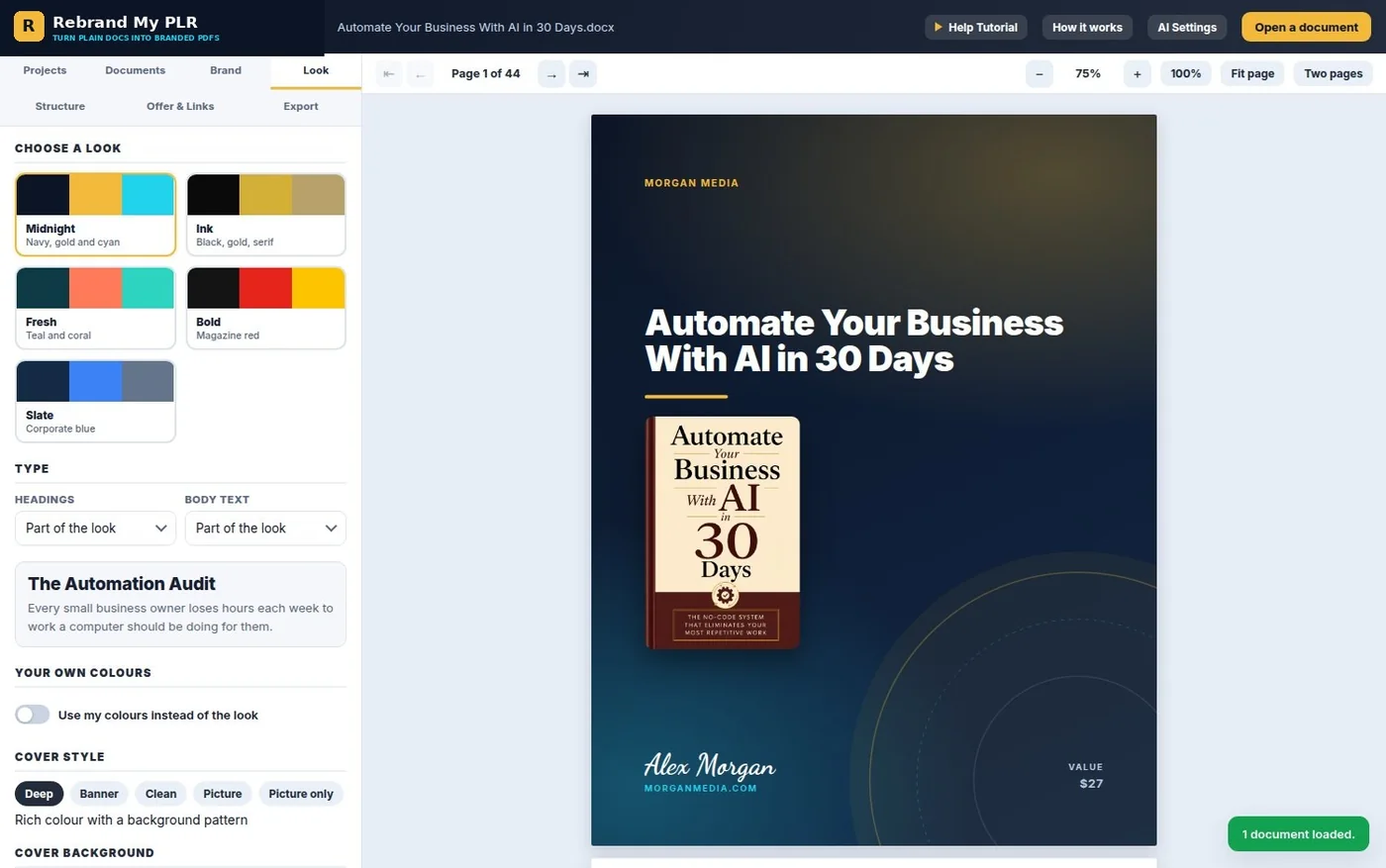
The practical appeal is speed and consistency. If you are producing several lead magnets, short reports or PLR-based products under one brand, saving the visual system once can remove repetitive setup work. If you only create one highly custom publication a year, a general design tool may give you more freedom.
Before and After: What the Document Makeover Changes
This side-by-side example shows the kind of transformation Rebrand My PLR is built to deliver. The core content stays the same, but the formatted output adds clearer hierarchy, more intentional branding and a stronger finished-product look.
This does not prove that every source file will require zero cleanup. It does show the type of transformation the product is designed to automate, and it is the right way to judge whether that kind of makeover is valuable to your workflow.
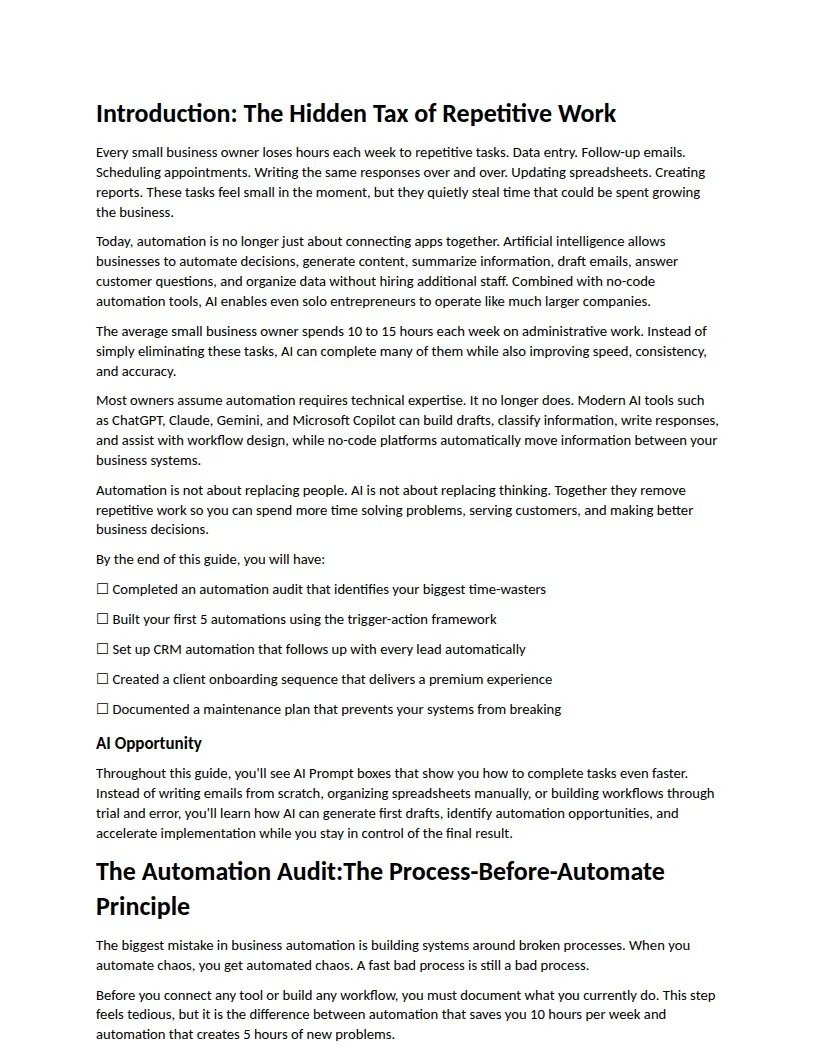
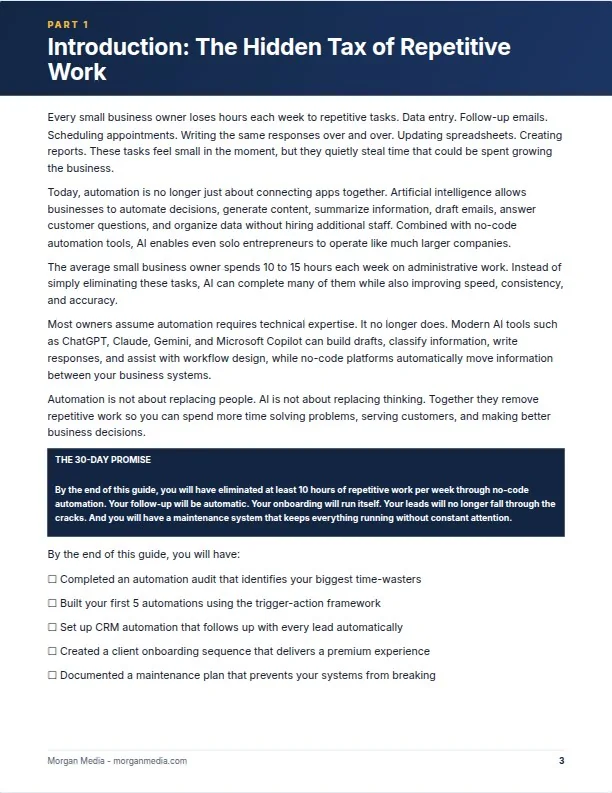
The official materials include a plain source page and the same content after Rebrand My PLR styling. The comparison illustrates the product's core promise more clearly than a feature list: the information remains the same, while the visual hierarchy, heading treatment, callout styling, footer and overall presentation are changed.
Document Structure Repair and Chapter Styling
One of the more useful documented features is automatic heading repair. PLR documents are often formatted visually rather than structurally: a heading may simply be bold text instead of a real Heading 1 or Heading 2 style. Rebrand My PLR says it detects likely headings, promotes them and exposes the document outline in a Structure tab so the user can correct levels manually.
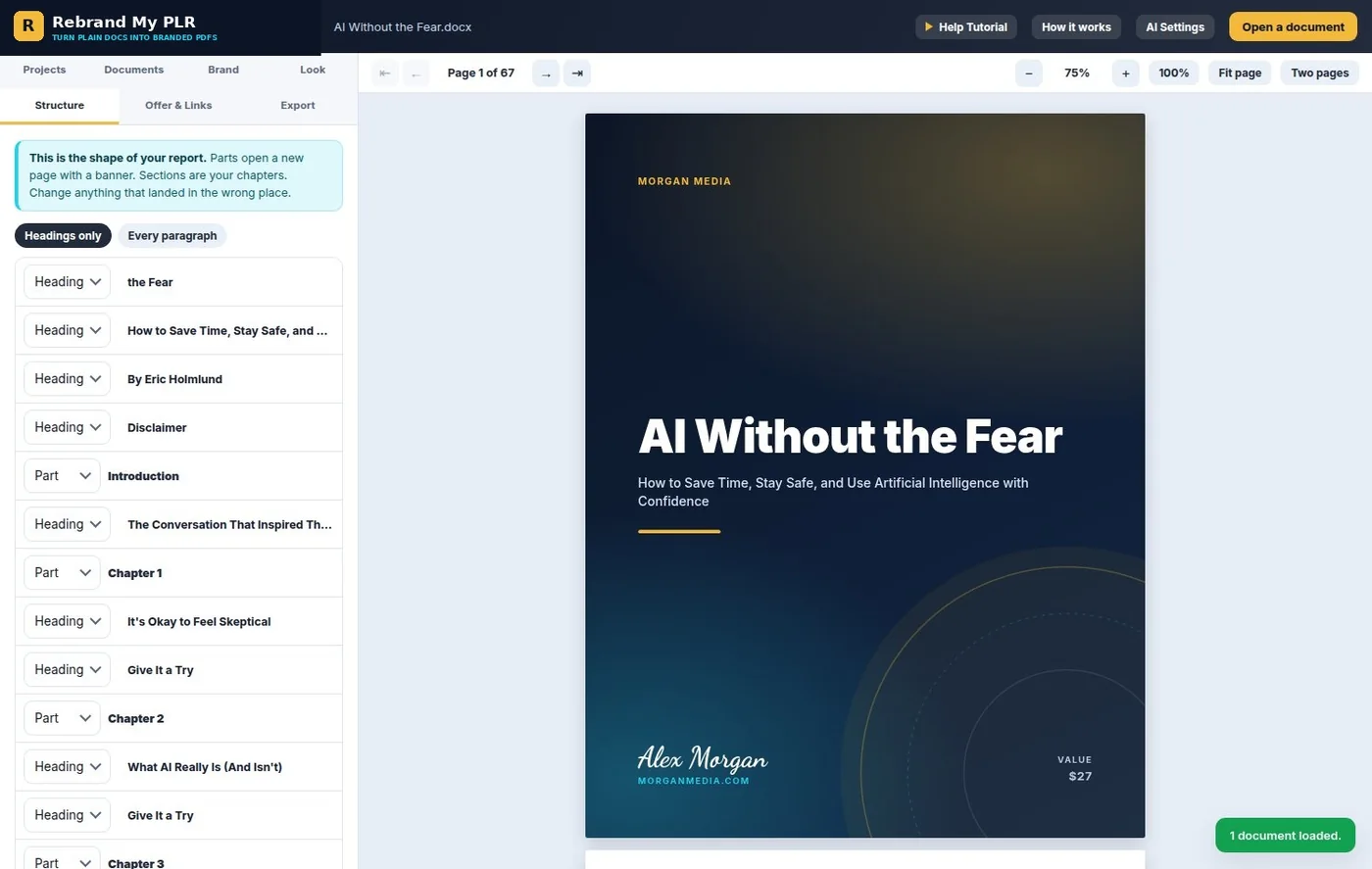
This matters because a contents page and chapter breaks are only as useful as the underlying structure. Automatic repair can reduce cleanup, but users should still review the outline before exporting. No automated heading detector can understand every unusual PLR file perfectly.
The current product page also says parts and chapters can open on their own pages with designed banners, while tips, prompts and action steps can receive styled callout treatment. That is useful for turning plain material into something that feels more intentionally published without designing each page individually.
Offer Page and Link Replacement
Rebranding PLR is not only about changing colors and adding a logo. The original document may contain links that need to be removed, replaced or changed to the new publisher's own resources. Rebrand My PLR's Offer & Links area lists web addresses found in the document and lets the user swap them.
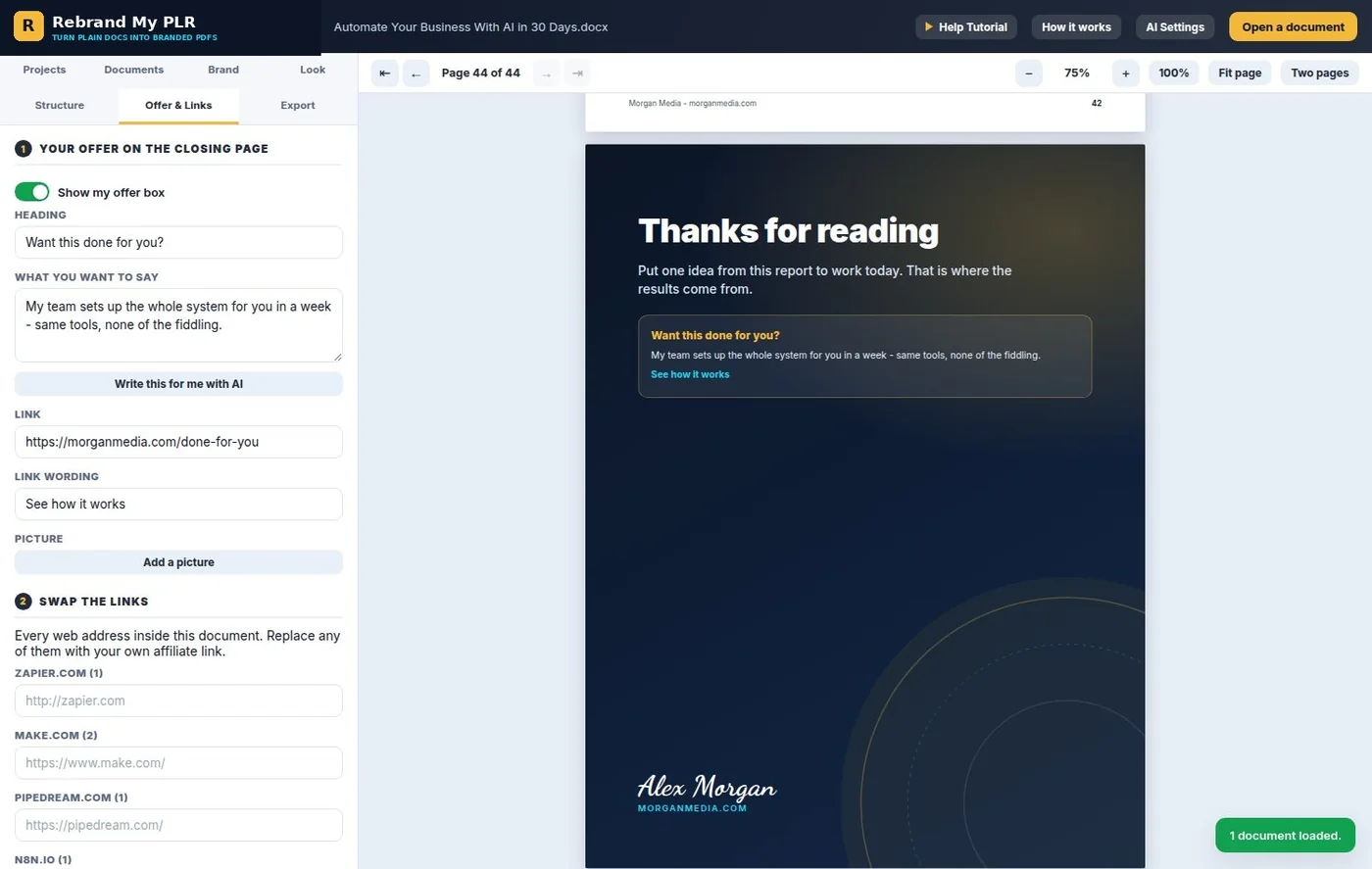
The current offer also includes a designed closing page where you can add a headline, short pitch and button, plus an optional extra page. For marketers using reports as lead magnets or low-ticket products, this gives the document a clear next step instead of ending abruptly.
If your main use case is list building, the related IM Review HQ guide on building an email list for affiliate marketing explains where a focused lead magnet fits into the broader opt-in and welcome-email workflow.
Export Options: PDF, Print and Self-Contained Web Page
The current product page describes three output paths: download a print-quality PDF, use the browser's print route for sharp text, or save the report as a self-contained web page. It also advertises batch download for multiple loaded documents and the ability to save brand settings to a file and load them on another computer.
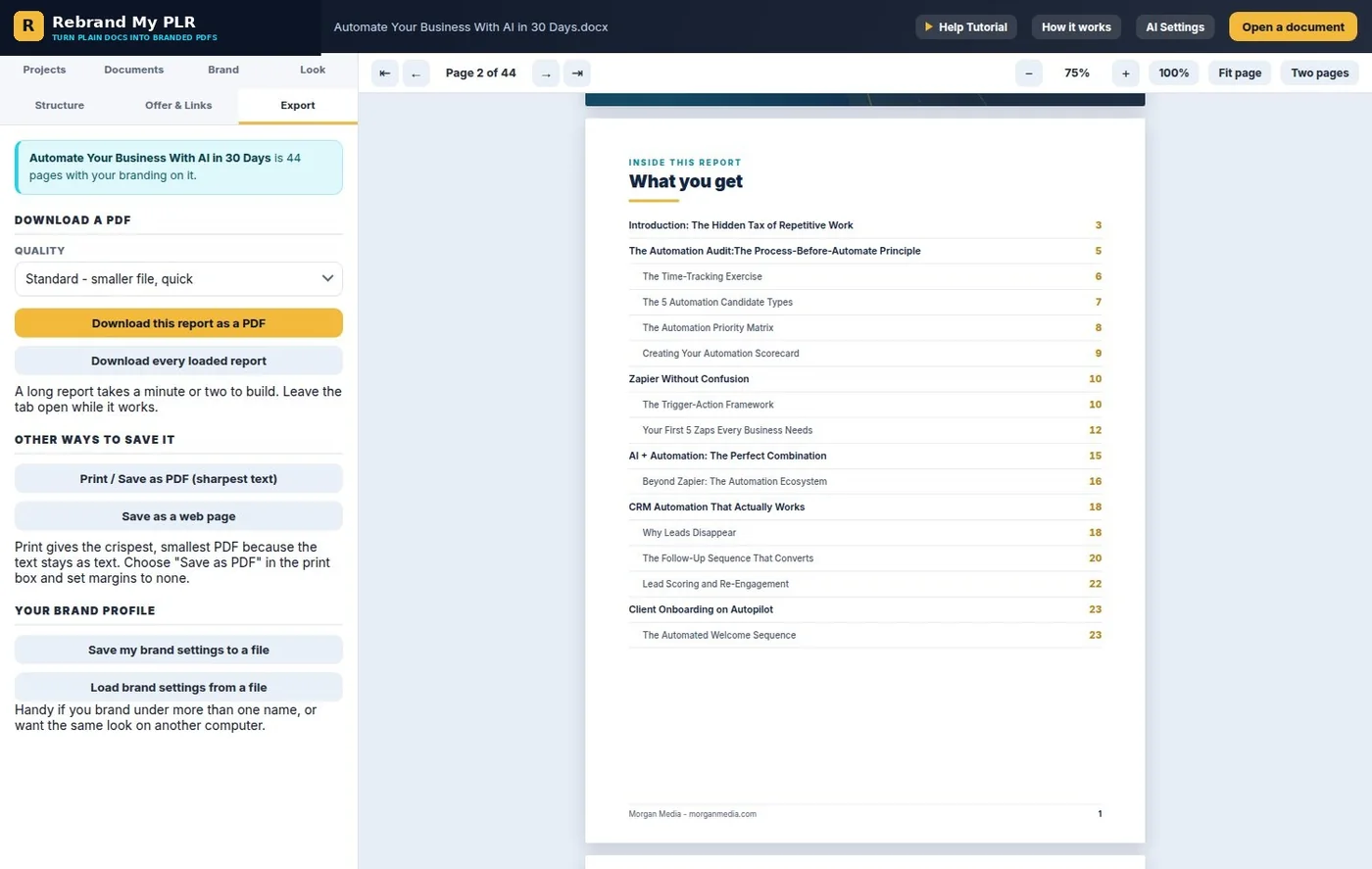
The important limitation is that PDF is an output, not an input. The official FAQ specifically says the software does not read PDFs. If the only version of your source material is a locked or image-based PDF, you need an editable Word, text, Markdown or saved web-page version before this workflow fits.
The Browser-Local Privacy Model
The current Rebrand My PLR page states that documents, logos and client files stay on the user's computer because the application processes them inside the web page. It also says there is no required account or server-side file storage for the core document workflow.
That is a meaningful distinction for users working with client material, licensed PLR or unpublished drafts. It reduces the need to send every source file to a third-party document-conversion server simply to restyle it.
Projects and settings are described as being remembered in the browser. As with any browser-local workflow, users should keep their own source files and exported documents backed up rather than treating a browser project as the only copy.
Rebrand My PLR Price and Refund Policy
When checked on September 25, 2026, the official sales page displayed a regular price of $97 and a current promotional price of $47 as a one-time payment. The page states there is no monthly subscription for the core product.
Optional AI helpers are separate. The current site says logo generation, cover-art generation and title suggestions can use your own API key from OpenAI, Anthropic, Google or OpenRouter. Those optional provider charges are not the same thing as a recurring Rebrand My PLR subscription.
Pricing and offer details can change. The official page is the source for the current checkout price and purchase terms.
See Current Rebrand My PLR OfferIM Review HQ Decision Factors
Because this is an owner-disclosed review, the most useful approach is to make the tradeoffs explicit rather than turn the product into a numeric score.
| Decision factor | What the current evidence shows | Buyer implication |
|---|---|---|
| Source-file compatibility | Word, text, Markdown and saved web pages are supported; PDF input is not. | Confirm you have an editable source version before buying. |
| Speed vs manual design | Branding, cover treatment, contents, structure and links are handled in one focused workflow. | Strongest fit when repetitive document formatting is the bottleneck. |
| Privacy | The product page states core document processing occurs inside the browser with no document upload. | Useful when you prefer to keep source material on your own computer. |
| Customization | Five cover styles, 14 backgrounds, eight fonts and custom brand colors are documented. | Provides repeatable styling, but it is not positioned as a pixel-by-pixel design suite. |
| AI cost | AI helpers are optional and use your own provider key. | Core rebranding does not require an AI subscription, but optional generation can create separate API charges. |
| Purchase flexibility | $47 promotional one-time price; sales are final under the current policy. | Check the demo, supported inputs and terms before purchasing. |
Rebrand My PLR Advantages and Trade-Offs
Pros
- Focused workflow for turning existing written content into a more polished branded document.
- Current product page says documents remain on the user's computer during core processing.
- Supports Word, plain text, Markdown and saved web pages.
- Automatic heading repair can reduce cleanup on poorly structured PLR files.
- Built-in link replacement and closing-page offer can make repurposed documents more usable for marketing.
- Multiple export routes plus reusable brand settings.
- Core product is currently sold as a one-time purchase rather than a monthly subscription.
Cons
- Does not import PDF files.
- Automatic structure detection still needs human review on messy or unusual source documents.
- Optional AI helpers require your own API key and can create separate provider costs.
- The current sale is final and non-refundable except where required by law.
- It does not create resale rights for content you do not already own or license.
- This review is owner-disclosed rather than an independent third-party evaluation.
Alternatives and Buying Considerations
Rebrand My PLR is one way to solve the packaging problem, not the only way. The better approach depends on how much manual control, collaboration and repeatability you need.
| Option | Core approach | When it may fit better |
|---|---|---|
| Rebrand My PLR | Focused browser workflow for rebranding editable documents and exporting finished files. | When speed, repeatable branding and local processing are the main goals. |
| Word or Google Docs + manual formatting | Format the original document directly using the tools you already know. | When the document is simple and you do not mind repeating layout work. |
| Canva-style manual design workflow | Rebuild or paste the content into a visual design environment. | When maximum page-by-page visual control matters more than speed. |
| General ebook/lead-magnet builders | Dedicated publishing tools with their own templates and workflows. | Worth comparing when you need features outside document rebranding, such as hosted libraries or a different publishing workflow. |
If you are evaluating the economics of a one-time software purchase, the Software Deal Value Calculator can help compare the purchase cost with the amount of time or outside design work you expect the tool to replace.
Who Should Consider Rebrand My PLR?
Worth considering if
- You buy PLR in Word or text formats and want to replace generic presentation quickly.
- You create lead magnets, reports or short ebooks repeatedly.
- You want consistent branding across multiple documents.
- You prefer browser-local processing for source documents.
- You want link replacement and a closing offer built into the same workflow.
Consider another approach if
- Your source material exists only as PDF files.
- You need unrestricted page-by-page design freedom.
- You mainly need a writing tool rather than a document-formatting tool.
- You require an independent third-party review before buying this owner's product.
- A final-sale purchase policy does not fit your buying preferences.
Rebrand My PLR Conclusion: Best When Formatting Is the Bottleneck
Rebrand My PLR has a clear use case: take content you already have and shorten the distance between an editable document and a branded product-ready PDF. The current feature set is most relevant to marketers who repeatedly work with PLR, lead magnets, reports, short guides or AI-assisted drafts and do not want to rebuild the same cover, contents, chapter styling, branding and link structure by hand.
The buying decision comes down to source format and workflow. If your material is in Word, text, Markdown or saved web-page form and the repetitive formatting step is what keeps projects unfinished, the product is closely aligned with that problem. If you need PDF import, highly bespoke visual design or a broad collaborative publishing suite, compare other approaches first.
Because Rebrand My PLR and IM Review HQ share ownership, readers should treat this page as an owner-disclosed product analysis rather than an independent endorsement. The reason to consider the product should be the documented workflow and fit, not the existence of this review.
Review the official demonstration, supported file types and final-sale terms before purchasing.
Visit Rebrand My PLRRebrand My PLR Frequently Asked Questions
What does Rebrand My PLR do?
It turns supported editable documents into branded outputs with covers, contents, chapter styling, brand elements, link replacement and a closing offer page.
Which file types can it read?
The current product page lists Word (.docx), plain text, Markdown and saved web pages.
Can it import PDFs?
No. The official FAQ says PDF is an output rather than an input. You need an editable source version.
How much does Rebrand My PLR cost?
When checked September 25, 2026, the official page showed a $47 one-time promotional price reduced from a regular $97 price.
Are documents uploaded anywhere?
The current product page says the core app runs inside the browser and does not upload the documents, logo or client files to a server.
Do I need an AI API key?
Not for the core document rebranding workflow. The AI logo, cover-art and title helpers are optional and use your own supported AI-provider key.
Can I sell the PDFs it creates?
The output file is yours, but the right to sell the underlying content depends on the rights you already have. Rebrand My PLR does not create resale rights for unlicensed content.
Is there a refund?
The current sales page states that sales are final and non-refundable except where required by applicable law.