This AI marketing tool selection checklist gives you a practical way to compare software by workflow fit, output quality, integrations, total cost, privacy and real business value.
AI marketing software is now built into almost every part of the marketing stack: research, writing, design, video, email, automation, analytics and customer support. The difficult part is no longer finding an AI tool. It is deciding which tool deserves a place in your workflow.
A useful buying decision starts with the job you need done, not with the longest feature list. The right tool should remove a real bottleneck, fit the way you already work, produce output you can trust, and cost less than the value it creates. This guide gives you a repeatable framework for making that decision without getting distracted by launch hype or dozens of overlapping features.
Free calculators: Compare productivity value with the AI Tool ROI & Time-Savings Calculator and model your full stack with the Marketing Tool Stack Cost Calculator.
Quick Takeaway
This guide is designed to help you make a practical decision, not to push the largest possible software stack. Start with the job you need done, use the smallest set of tools that supports it, and expand only when your workflow gives you a reason.
What Changed in 2026: AI Adoption Is High, Reliability Still Varies
AI is no longer a niche software category. Stanford's 2026 AI Index reports that organizational AI adoption reached 88%. That makes tool selection less about whether to use AI at all and more about where it actually improves a workflow.
The same report describes a continuing “jagged frontier”: models can perform impressively on difficult benchmarks while still failing at tasks that appear simpler. For buyers, that means a polished demo is not enough evidence. Test the exact workflow, inputs and quality threshold you need.
For higher-risk uses, the NIST AI Risk Management Framework is a useful reminder to consider reliability, privacy, transparency and human oversight alongside speed and cost.
IM Review HQ takeaway: Treat AI software as workflow infrastructure, not magic. The best purchase is the tool that performs a repeatable job with acceptable quality, controllable risk and a cost that still makes sense at normal usage.
In This Guide
- Start With the Job, Not the Tool
- Understand the Main AI Marketing Categories
- Use a Six-Step Selection Framework
- Judge Output Quality, Not Just Speed
- Check Workflow Fit and Integrations
- Calculate the Real Cost
- Check Data, Privacy and Reliability
- Run a Small Trial Before Committing
- Common Buying Mistakes
- Final AI Tool Buying Checklist
Start With the Job, Not the Tool
The easiest way to waste money on AI software is to start with a product and then search for a reason to use it. Reverse that process. Write down the specific task that is slow, expensive, repetitive or difficult in your current workflow.
For example, “I need an AI marketing tool” is too broad. “I need to turn a finished product demo into five short social clips each week” is specific. So is “I need to draft first-pass email sequences from an existing offer brief” or “I need to organize keyword research into article briefs.” A narrow problem gives you a measurable way to judge whether a tool is useful.
Define the desired outcome in one sentence. Then list the inputs you already have, the output you need, how often the task occurs and what currently makes the task painful. If you cannot describe the problem clearly, you are not ready to compare tools.
Understand the Main AI Marketing Categories
Most AI marketing products fall into a few practical groups. Knowing the category helps you compare like with like instead of comparing an all-purpose assistant with a specialized production tool.
- Research and planning: idea generation, audience research, keyword organization, competitive research and campaign planning.
- Writing and content production: drafts, outlines, product descriptions, emails, landing-page copy and repurposing.
- Creative production: images, thumbnails, presentations, video, voice and other media assets.
- Automation: moving information between apps, triggering workflows, routing leads and reducing repetitive admin.
- Optimization and analytics: reporting, testing, segmentation, forecasting and identifying patterns in performance data.
- Customer communication: chat, support assistance, personalization and lead qualification.
A specialized tool may outperform a general tool for a narrow job, but specialization can also increase your total software bill. The right answer depends on how frequently you perform the task and how important the output is.
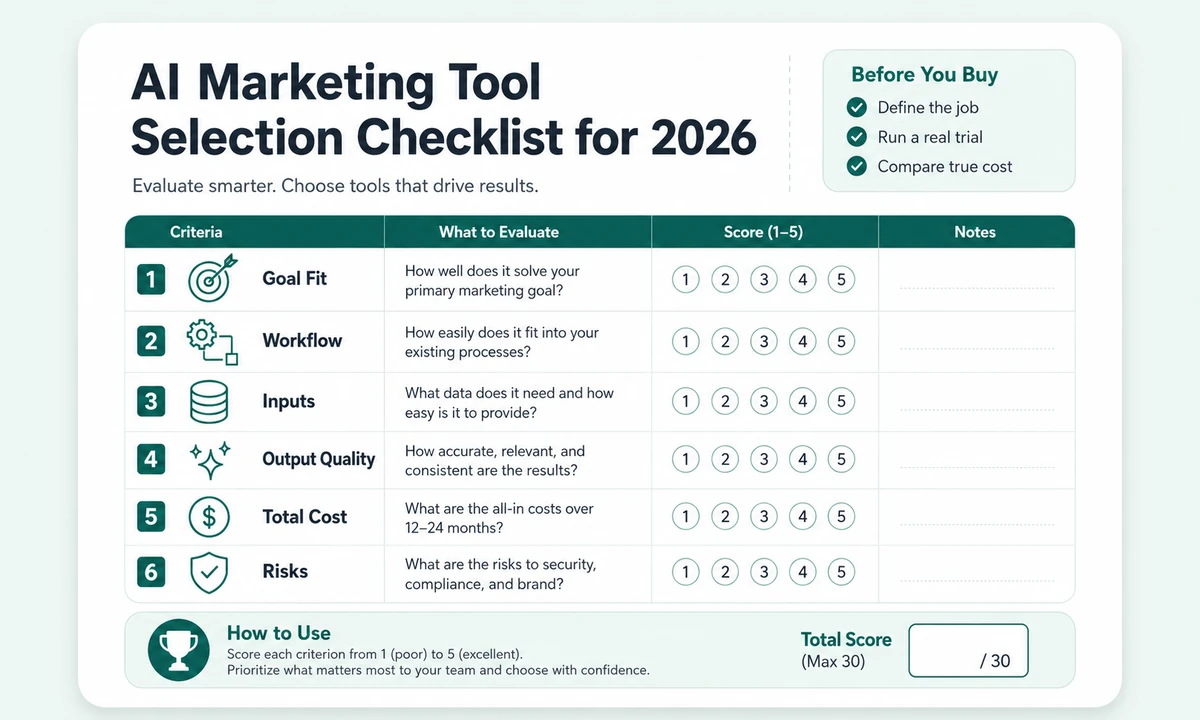
Use this checklist to compare AI marketing tools on the factors that matter before you buy.
Use a Six-Step Selection Framework
1. Define the outcome
Decide what success looks like before opening a pricing page. If the job is content production, success might be reducing first-draft time while keeping editing time manageable. If the job is video, it might be producing a usable draft without rebuilding every scene manually. If the job is automation, success might be eliminating a repeated handoff between two systems.
2. Map the real workflow
Write down the steps you perform today. Which step should the tool replace, shorten or improve? Tools that look impressive in a demo often create extra work around the edges: exporting, reformatting, correcting, moving files or recreating assets in another platform. Include those hidden steps in your evaluation.
3. Check the inputs
An AI system can only work with the information you can provide. Does the tool accept the file types, URLs, brand information, product data or source material you actually use? Can you give it enough context to produce a useful result? A tool that cannot ingest your existing material may force you to duplicate work.
4. Compare cost to frequency
A $50 monthly tool that saves five hours every week can be inexpensive. A $20 tool you use once every two months can be wasteful. Price should be evaluated against frequency, labor saved and the value of the finished output—not simply against another subscription price.
5. Check risks and constraints
Look for usage caps, credit systems, export restrictions, required third-party API keys, commercial-use terms, data handling policies and dependencies on other software. These details often matter more after the excitement of the demo wears off.
6. Run a real trial
Do not test with a toy prompt that you would never use in business. Give the product a real task from your workflow. Compare the result with what you currently produce, measure the time required to fix it and note where human judgment is still necessary.
Judge Output Quality, Not Just Speed
Speed is easy to demonstrate because a tool can create something in seconds. Useful quality is harder. Ask whether the output is accurate, specific, editable and appropriate for the channel where it will be used.
For written content, look for factual reliability, repetition, vague claims, brand voice and the amount of editing required. For images and video, look at visual consistency, control, artifacts, timing and whether the output can be revised without starting over. For analytics, ask whether the system explains its reasoning well enough for you to act confidently.
A good rule is to measure time to acceptable output, not time to first output. Ten seconds to generate something that needs forty minutes of repair is not necessarily better than a slower workflow that produces a near-finished result.
Check Workflow Fit and Integrations
A tool can be excellent in isolation and still be a poor choice for your business. Consider where the work starts and where the result has to go next. If your team lives in Google Drive, WordPress, a specific email platform or a project-management system, direct integrations or reliable exports can matter more than an extra generation feature.
Also consider collaboration. Can multiple users work inside the same account? Are roles and permissions available? Can you save brand settings or reusable templates? Does the product keep a useful project history? These questions matter as soon as a one-person workflow becomes a repeatable process.
Calculate the Real Cost
The advertised monthly price is only one part of the cost. AI products increasingly use credits, generation limits, storage tiers or outside API usage. Before you buy, estimate the volume you expect to use and calculate the likely monthly cost at that volume.
| Cost factor | What to check | Why it matters |
|---|---|---|
| Base subscription | Monthly or annual plan | Your fixed cost |
| Usage limits | Credits, words, minutes, generations | Can change the real monthly cost quickly |
| Required APIs | Third-party AI or data services | May add a separate bill |
| Team seats | Per-user pricing | Important if more than one person needs access |
| Export or storage | Watermarks, resolution, storage caps | Can force an upgrade |
If the vendor sells a lifetime plan, ask what parts of the service have ongoing operating costs. A lifetime license can be valuable, but AI generation itself usually depends on infrastructure that costs money to run. Understand what is actually included.
Check Data, Privacy and Reliability
Marketing work can include customer information, unpublished offers, internal documents and proprietary content. Before uploading sensitive material, review the product's privacy terms and understand whether your inputs may be stored or used for model improvement.
Validate the measurement layer: If an AI marketing workflow depends on analytics, use the Bot vs Human Traffic Detector to flag suspicious traffic segments and the GSC vs GA4 Traffic Reconciliation Analyzer to identify tracking discrepancies before trusting performance claims.
Reliability matters too. If a tool becomes essential to a weekly publishing workflow, you need a fallback when the service is unavailable or an integration breaks. Avoid designing a process that only works when one small vendor is online unless the time savings justify that dependency.
Run a Small Trial Before Committing
Create a short scorecard and run the same realistic task two or three times. Rate the result on usefulness, editing required, speed, control, integration fit and total cost. If the product offers a refund period, read the conditions before buying rather than assuming every purchase is reversible.
The goal is not to prove that the tool is impressive. The goal is to determine whether it earns a permanent place in your workflow.
Common Buying Mistakes
- Buying because the demo looks impressive. Demo conditions are optimized. Your workflow is the real test.
- Choosing the tool with the most features. Features you never use add complexity without adding value.
- Ignoring the editing step. The first generated output is rarely the finished business asset.
- Stacking overlapping subscriptions. Three inexpensive tools can cost more than one better integrated platform.
- Trusting “unlimited” without reading limits. Fair-use policies, queues or generation caps may still apply.
- Automating judgment-heavy work too early. Use automation first on repetitive, well-defined tasks.
Final AI Tool Buying Checklist
Before You Pay
- Can I describe the exact problem this tool solves?
- Does it fit my existing workflow and file types?
- Have I checked the real cost at my expected usage?
- Can I verify the output before it reaches customers?
- Do I understand the privacy and data implications?
- Have I tested it on a real task rather than a demo scenario?
- Would I still buy it if the launch bonus disappeared tomorrow?
The best AI marketing tool is not the one with the longest feature list. It is the one that solves a recurring problem, creates an acceptable result with less effort, fits the rest of your stack and continues to make financial sense after the novelty wears off.
Build a Simple Decision Matrix
When two or three tools all look capable, compare them against the same buyer-specific criteria rather than whichever feature is emphasized most heavily on the sales page. The framework below totals 100 points, but it is not a public product rating. It is a private planning worksheet for deciding which tool best fits your own workflow.
| Decision factor | Weight | What to verify |
|---|---|---|
| Workflow fit | 25 | Does it remove recurring steps, or simply move work into another interface? |
| Output quality | 20 | How much editing, fact-checking or regeneration is required before the result is usable? |
| Integrations & portability | 15 | Can you export your work and connect the tool to systems you already use? |
| Total cost at normal usage | 15 | Subscription, API, credits, seats, storage and likely overages—not just the headline price. |
| Data & operational risk | 15 | What data is sent to the service, what human review is still needed, and what happens if the tool changes? |
| Reliability & support | 10 | Can you depend on it for recurring work, and is documentation/support sufficient when something breaks? |
Score each factor from 1 to 5, multiply by the weight, and compare totals. More importantly, read the reasons behind the scores. A five-point difference should not override a deal-breaking limitation such as poor exports, unacceptable data handling or an API bill that scales badly.
Separate the financial question: Use the AI Tool ROI & Time-Savings Calculator to test whether the time value actually exceeds the ongoing cost. The decision matrix tells you which tool fits; the calculator helps determine whether buying one makes financial sense at all.
General AI Tool or Specialized Tool?
General AI assistants are flexible. They can brainstorm, summarize, draft and help with many small tasks from one interface. Specialized products are usually built around a narrow workflow such as thumbnail creation, video production, SEO briefs or email automation.
Choose a general tool when your tasks change frequently and you are comfortable guiding the output yourself. Choose a specialist when the same workflow repeats often enough that templates, integrations and purpose-built controls save meaningful time.
There is also a third option: use a general tool for thinking and a specialist tool for production. For example, you might outline a campaign in a general assistant and then create the final assets in a purpose-built video or email platform. This avoids forcing one product to be excellent at everything.
Be Careful With Annual and Lifetime Deals
Annual pricing can be attractive, but it reduces your ability to switch if the product does not become part of your normal workflow. Before committing for a year, ask whether you have used the tool enough to know that it saves time repeatedly rather than just once.
Lifetime offers deserve an additional check. Determine whether the license includes future AI usage, whether credits reset, whether new models require separate fees and what happens if a third-party API changes. A lifetime software license does not necessarily mean unlimited lifetime generation.
Three Example Buying Scenarios
Scenario 1: A solo affiliate publisher
The highest-value tool may be one that reduces research organization or repetitive production work. Collaboration features and large team limits are probably unnecessary. Low operating cost and easy export may matter more than enterprise integrations.
Scenario 2: A creator publishing weekly videos
Production speed becomes a real constraint. A specialized thumbnail, scripting, transcription or editing tool can be valuable if it saves an hour on every video. In this case, a tool does not need to replace the entire production stack to pay for itself.
Scenario 3: A small marketing team
Consistency, permissions, shared assets and integrations become more important. A slightly more expensive product may be the better value if it reduces handoffs and keeps work inside one controlled workflow.
Questions to Ask Before You Subscribe
- What task will I use this for every week?
- What does the tool replace?
- What still requires human review?
- What are the usage limits at my expected volume?
- Can I export my work if I cancel?
- Are brand settings reusable?
- Does the vendor explain how uploaded data is handled?
- Is there clear documentation and support?
- What competing tool would I choose if this one disappeared?
If you can answer those questions before paying, you are far less likely to end up with another subscription that looked exciting for a week and then sat unused.
Browse IM Review HQ's review section for research-based product reviews with pricing checks, evidence, tradeoffs and buyer-fit analysis.
See the Content Marketing Tools & Content Strategy Software hub for strategy, AI, CMS, SEO, distribution and analytics.